One of the more popular references is this table that is updated yearly (comes from very comprehensive post about passwords and how breakable they are)
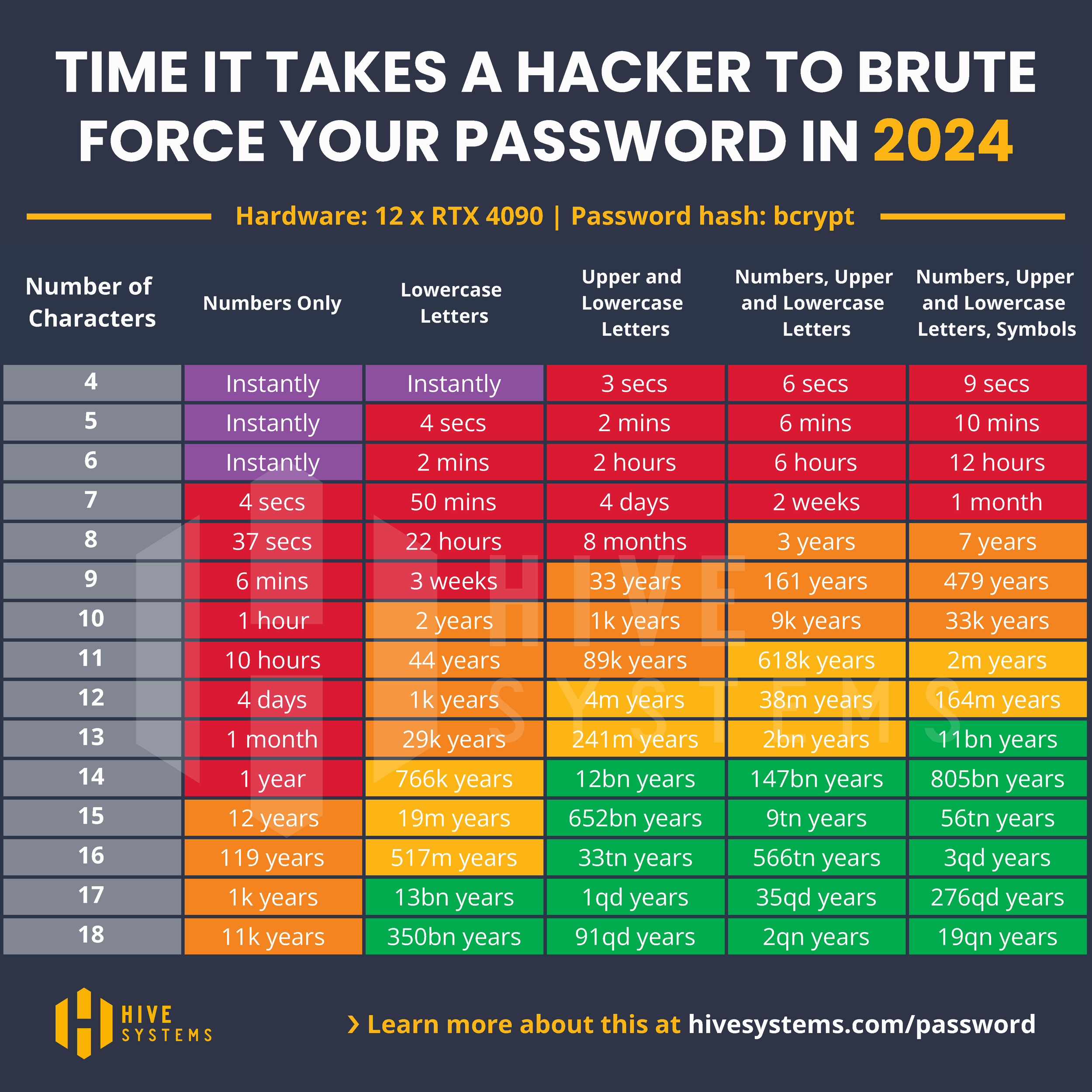
(Note, you want/need to have a password that is a box or two better than what you might consider “ok” to future proof it for a year to two [edit to add: Note also that the protections of the pw effect that actual times as well as the used computing resources and several other factors, so the main takeaway from that should be just the relative streanght/weakness of different types of pw])
As can be seen, number needs to be ridiculously long to really compete with a proper password (remembering that this is just indicative of length - if it’s guessable, it’s much faster with different techniques). The good thing is that the number (if use is akin to a pin) with L5 can be longer than standard 4,5, or 6 digits. The bad thing of course is that that’s not enough compared to password needs. The blog post goes to good details about the specifics.
It would be really nice usability feature if there was a separate lockscreen pin, but like I said, it depends on the use/risk profile. Randomised keyboard (like with keypad) would be an interesting option (could use more screen space, showing more and bigger buttons, if anyone is interested in implementing that feature.
[edit: btw. sorry for the lack of pedantry about the “root” password - I lumped it in earlier message together as for new or basic user the separation between sudoing and root may be irrelevant]