Someone wanted the purple keyboard in this purism news
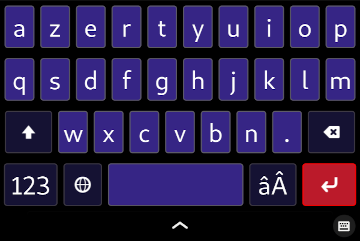
Here you go, just copy/paste the following in the file ~/.config/gtk-3.0/gtk.css
sq_button {
    background-color: #362585; /* Background of the key */
    color: #ffffff; /* color of the characters in the key */
}

sq_view {
    background-color: #000000;
}

sq_button.altline,
sq_button.wide,
sq_button.special {
  background: #151233;
}

sq_button:active,
sq_button.altline:active,
sq_button.special:active,
sq_button.wide:active {
  /* Settings of the keys when you press a key */
  background: #747077;
  border-color: #96949d;
}

sq_button.locked {
  /* Settings of the keys like 'ctrl' or 'alt' when locked */
  background: #ffffff;
  color: #2b292f;
}

#Return {
    background: #bb1a2a;
    border-color: #ff0000;
}

#Return:active {
    background: #1c71d8;
    border-color: #3584e4;
}