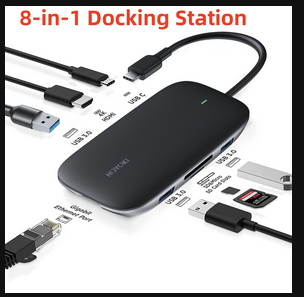
One great feature of the Librem 5 is the ability to use it like a desktop PC complete with Keyboard, mouse, and full-sized monitor. When connected to the correct hardware, a high resolution desktop display, and keyboard and mouse control are the norm for the Librem 5. The question here for many is to ask “what is the “correct” hardware? I have wasted the purchase of several different types of hardware trying to figure that out. When a given USB-C phone cradle or docking station doesn’t work, I toss it in the trash and order something else, for the next attempt. And I have some answers now. I also have some solutions.
Some people may ask “why not just use Purism’s published solution and buy a lapdock?” As much as I am sure that works, it appears to be a clunky solution to me and it’s way overpriced. When you buy a lapdock from Purism, they sell you a product that retails from Nexdock for $299.00 (a Nexdock 360) and mark it up to $550.00 (your price). They do throw in a phone cradle that you could have bought on Amazon for $5.00. So Purism makes a profit of around $245.00 for just buying and then reselling another company’s product to you. Even at a price of $305.00 though (if you buy direct from Nexdock and Amazon), it’s still way overpriced and still a clunky solution.
I’ll explain my definition of clunky here. If I want a laptop pc, I’ll buy a laptop pc, probably for less than the $550.00 cost of the lapdock. Why buy something that is much bigger than your Librem 5 and more expensive than a laptop that only looks like a laptop but is mostly an empty shell for the most part, only to utilize your librem 5 where you wouldn’t even need it, if you did have a real laptop pc? If you want Linux, format that Windows laptop hard drive and install Linux on it. But you still have to carry that empty shell of a laptop with you when you travel. It’s a hokey, hillbilly solution in my opinion. What you need is a small docking station, not an empty shell of a laptop PC. I want a docking station that fits in my pocket and is what I use for convergence with my phone. Everywhere I go, I use docking stations. I have docking stations at home and at work. So I sit down at either location, plug in my Librem 5 to the USB-C instead of turning on my laptop there, and suddenly my phone is now a computer with a full screen, with a keyboard and mouse and high resolution monitor. And what if I paid only $70.00 or less for the docking station? In addition, I don’t need to find room on my office desk top for a mostly empty shell that only pretends to be a laptop PC. My Librem 5 fits anywhere while in use in convergence mode. I just want to plug it in and experience convergence using my regular docking station to my regular monitor and USB devices that I use to dock to other devices, without having to set up a fake laptop pc at my desk every time.
So here is what I have found so far. You will read in several places that the Librem 5 requires an “ALT DP” or “ALT Display Port” protocol to get convergence. That may or may not be true. But none of the docking stations that promise ALT display port on Amazon will work. None of the cradles that promise compatability with Samsung Dex will work either. No low cost docking station has worked for me yet. The $300 docking station for my employer’s company laptop (a Lenovo) works just fine for convergence with my Librem 5. I was shocked to see the high screen resolution for my Librem 5 in Convergence mode. But that docking station is way overkill. I am only using one HDMI monitor plug and two USB‐A plugs for the keyboard and mouse. I quickly discovered that the key is in the USB-C plug that plugs in to your Librem 5 from the docking station. It’s a Thunderbolt plug, which is backward compatible with ALT DP protocols. I don’t know if Thunderbolt 1 or Thunderbolt 2 will work or not. But absolutely, Thunderbolt 3, Generation 2 or higher does work for convergence with the Librem 5. That is what is on the higher-end docking station that I am using now. Make sure that your docking station is Thunderbolt 3, Gen 2 or higher if you want a strong likelihood of getting a positive result for Librem 5 convergence. I found one of those Thunderbolt 3, Gen 2 docking stations on Amazon for $65.00. For those who are not afraid of risk, you might find a Thunderbolt 1 or 2 docking station somewhere for around $30 and it might work. The docking station has to have this Thunderbolt connector that is physically the same plug as USB-C, to connect to your Librem 5. But you also want a second, similar looking plug (USB-C) power only input to the docking station that says “PD”. That is a USB-C charging- only port. When you plug the Librem 5 into the Thunderbolt 3, Gen 2 Port and a 65 Watt or more USB charging plug in to the PD port of your docking station, amazing things happen. The Librem 5 is happy, the Librem 5 battery charges while using the Librem 5 as you do your work, nothing anywhere heats up, and the display gives a very high resolution. And of course, the keyboard and mouse work normally.
I just didn’t think that Purism steered everyone right on the convergence options. Hopefully this information is helpful to someone.
 For the adapter I use an old Hoyoki dock that I bought years ago.