For a regular - adventurous user - When will Crimson image be available for installing?
Interesting question. I think it depends on the level of adventurism. If your are fine with fully reflashing your Librem 5, I think the time could be now. If you want to upgrade from Byzantium to Crimson, maybe a little more patience is better. For me the most difficult (and time consuming) thing was to make sure no data, files, photos, videos, but also settings and configurations of apps was lost. I did this mostly manually. I tried both flashing and upgrading.
1 Like
Thank you for the reply.
I’m happy reflashing the device.
I couldn’t find the instructions in Horesh to do it with regards to crimson.
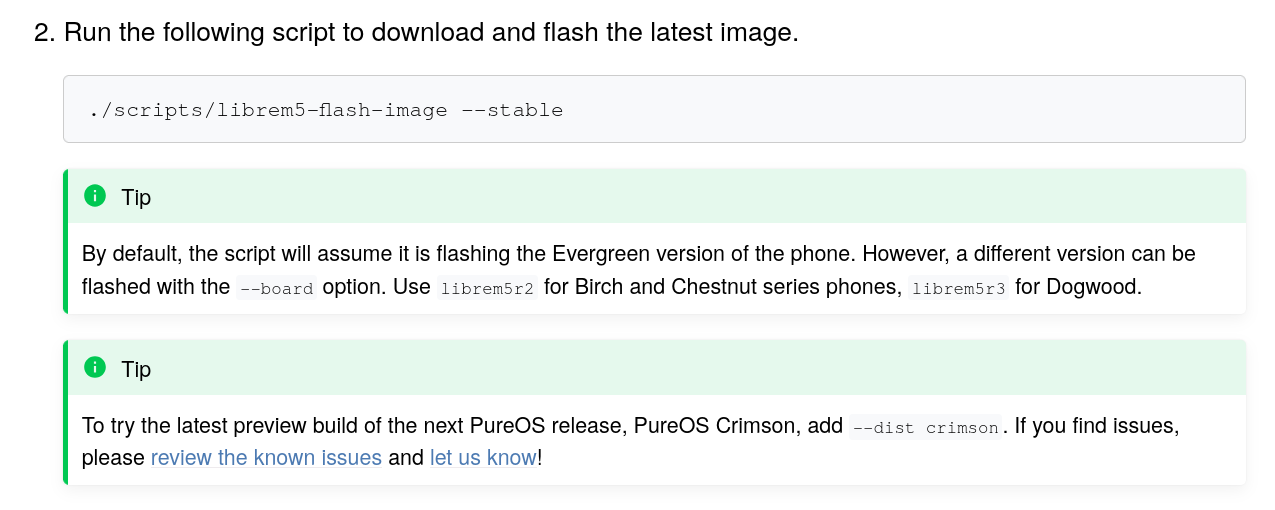
See the second tip in the screenshot above.
So I think you should use (I’m not sure if sudo is really needed, but I think for me it was):
sudo ./scripts/librem5-flash-image --stable --dist crimson
I followed this instruction Reflashing PureOS - Purism user documentation. Pretty straight forward, except I was flashing from archlinux and had to deal with dependencies myself
2 Likes
And I would say … image your byzantium install with Jumpdrive before starting. That way, if there is some showstopper with crimson for you personally, there is an easy way to revert.
2 Likes
This is the line I used
librem5-flash-image$ sudo ./scripts/librem5-flash-image --variant luks --stable --dist crimson
Below is the output suggesting it’s all good.
When starting the device it asks for the luks password - I used my the luks password which was on the device before the re flashing - but it didn’t work.
is there a generic luks password?
2026-01-02 11:05:35 INFO Looking for librem5r4 luks crimson latest image
2026-01-02 11:05:36 INFO Found disk image Build “stable” ‘Last stable librem5r4 build’ from Sat Aug 30 17:38:38 2025
2026-01-02 11:05:36 INFO Looking for librem5 u-boot
2026-01-02 11:05:37 INFO Found uboot Build “stable” from Wed Jun 21 13:54:04 2023
2026-01-02 11:05:37 INFO Downloading to /home/user/librem5-flash-image/tmp_librem5-flash-image___g4n3cv
2026-01-02 11:05:38 INFO Downloading image from ``https://storage.puri.sm/librem5/images/crimson/latest/librem5r4/luks/artifact/librem5r4.img.xz
2026-01-02 11:15:40 INFO Calculating sha256sum of /home/user/librem5-flash-image/tmp_librem5-flash-image___g4n3cv/librem5r4.img
2026-01-02 11:15:44 INFO Downloading uboot from ``https://storage.puri.sm/librem5/u-boot/latest/artifact/output/uboot-librem5/u-boot-librem5.imx
        Enter the flashing mode by holding volume-up button while turning the phone on.

        If it's not detected, follow these steps:
        - Ensure that the phone is powered off
        - Turn all Hardware-Kill-Switches off
        - Unplug the USB cable if connected
        - Remove battery
        - Hold volume-up button
        - Insert the USB-C cable (red light blinks, no green light)
        - Reinsert the battery (red and green lights constantly on, the script will continue)
        - Release volume-up button
Searching…uuu (Universal Update Utility) for nxp imx chips – lib1.5.141
Success 1 Failure 0
2:1 11/11 [Done ] FB: Done3:1 3/ 3 [=================100%=================] SDPV: jump
Flashing complete.2026-01-02 11:23:29 INFO Cleaning up.
 after the above post - I tried 123456 - and it seems to work….???
I keep this here in case some other poor sod like me may get stuck on this silly thing in the future.
1 Like
As this keeps coming up and at some point more users (more of less savvy users) will be doing this despite the updating option from byz, I wonder if the script could be updated / developed further to be more user friendly. Things that come to mind:
- add a menu with choices for most common options (select “1” for latest stable LUKS distro variant, “2” for previous stable LUKS, “3” for latest non-LUKS, etc., select “9” for prompt [manual])
- add an option to take whole disc image as a backup before proceeding with new image [if you want partition only or something special, there are other tools; also, encryption of old image backups would be good bonus]
- add an option to write a backup disc image back to device
- find and show list of available distro image versions with creation dates and version numbers and features (LUKS etc.)
- option to save downloaded image and reuse it (don’t delete image)
- image hash check
- reminder of default LUKS and OS pw
- a couple of troubleshooting messages (dependency version check, discspace for downloading etc.)
- show a bit of an intro/explanation text about what the script is for, what version it is, how to physically set up the devices (computer, OS, cable, L5), including what to do with cable and battery [so no need to look info from a separate site for basics, but maybe also a link to L5 manual for more info]
- something else too..?
3 Likes
You missed this note in the linked reflashing instructions. 
(… unless it was only added after you mentioned it above.)
This already happens. The download includes a file, meta.yml, and that includes a SHA256 hash of the disk image and the reflash procedure does verify the hash before proceeding.
This option already exists. (Just my opinion: unless the host computer is short of disk space, this should be the default i.e. option default is the wrong way round.)
1 Like
On the first, I don’t remember there being a declaration of that (happens in the background?) and what that means. On the second, the default seems to be to always reload as after image has been written the cleanup gets rid of it - it doesn’t look for an existing one from local directory and compare what’s available online (although it can be forced to use one). “Option” may have been a bit vague - there are several ways to do the menu, defaults and selections for all those.
You may be right that this is undocumented. Assuming that Purism intends this to be permanent functionality - and it seems as if some kind of integrity check should always happen - then perhaps it ought to be documented. @JCS ?
But you can easily examine the Python code to see this for yourself. (I personally don’t speak Python but I can read it well enough to get a sense of what the code is doing. A reflash of mine was such a mess, due to network problems, that I ended up downloading that YAML file manually and then verifying the hash manually, which is how I know about this. A stuff-up is always a learning opportunity. )
And while I am overengineering this post to death … one thing that I do, after downloading the disk image and before flashing it, is to override the default LUKS password etc. That way, if I reflash from the same disk image again later on then the phone is secure out of the box (with what is to me then a secure “default” LUKS password). However this has the effect, of course, of breaking the hash (so that the hash can only be used immediately after the download but not again later on). So that needs to be borne in mind.
1 Like
Like I said, more it could be much more user friendly - and by that, for those less technically savvy (most users), to be more welcoming.