I tried following instructions here in an attempt to flash Crimson to my phone.
One thing is that the wireless killswitch doesn’t work any more, maybe that is the reason? When I bring all switches down, lockmode is (well, was, before I tried reflashing) indeed enabled but the wireless card is still powered and working.
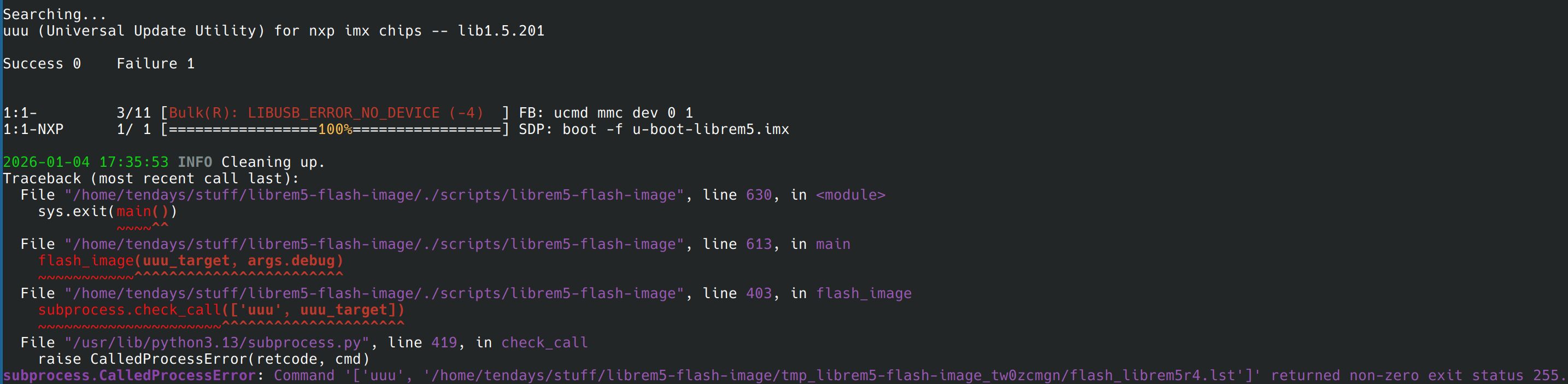
When I plug the cable at step 4. 4. 1., instead of expected flashing red, I get flashing green and orange, and in the terminal it seems to start sending to the phone (short progress bars with = signs). When I then put the battery into the phone the light is green, and in the end I see this in the terminal:
@JCS there is a rescue-mode on pin-out on L5, so please on Librem 5 v2 enable a physical emergency button with a fancy red light to put L5 on Burn Mode by default, this help if first 2 option failed to put L5 on Burn Mode. ATM i not sure if Flex Breakout Board ship this feature by using a jump.
Make Red light flashing on Burn Mode.
Make Red light flash on Hood Open.
Put a nice light sensor to reproduce a nice red color like a star. Give me the best libre-electronic ever, without thinking about how much will be. I Hate Cheaper. I Not Game.
Try different USB-C cables and at different orientations. It was finicky for me.
The timing of when I had to re-insert the battery was very particular, I had to try this many times until it took.
Okay, so I understand from @dos ‘s message that we don’t actually need that battery and cable gymnastics while the script is waiting, so I did it before running the script (presumably putting the phone in flash-mode). Then it all went very smoothly.
I also told my children what an awesome community this is, where I send a HELP, and eleven minutes later someone posts the solution!
@spacemanspiffy I had tried multiple cables and even multiple host computers without success…