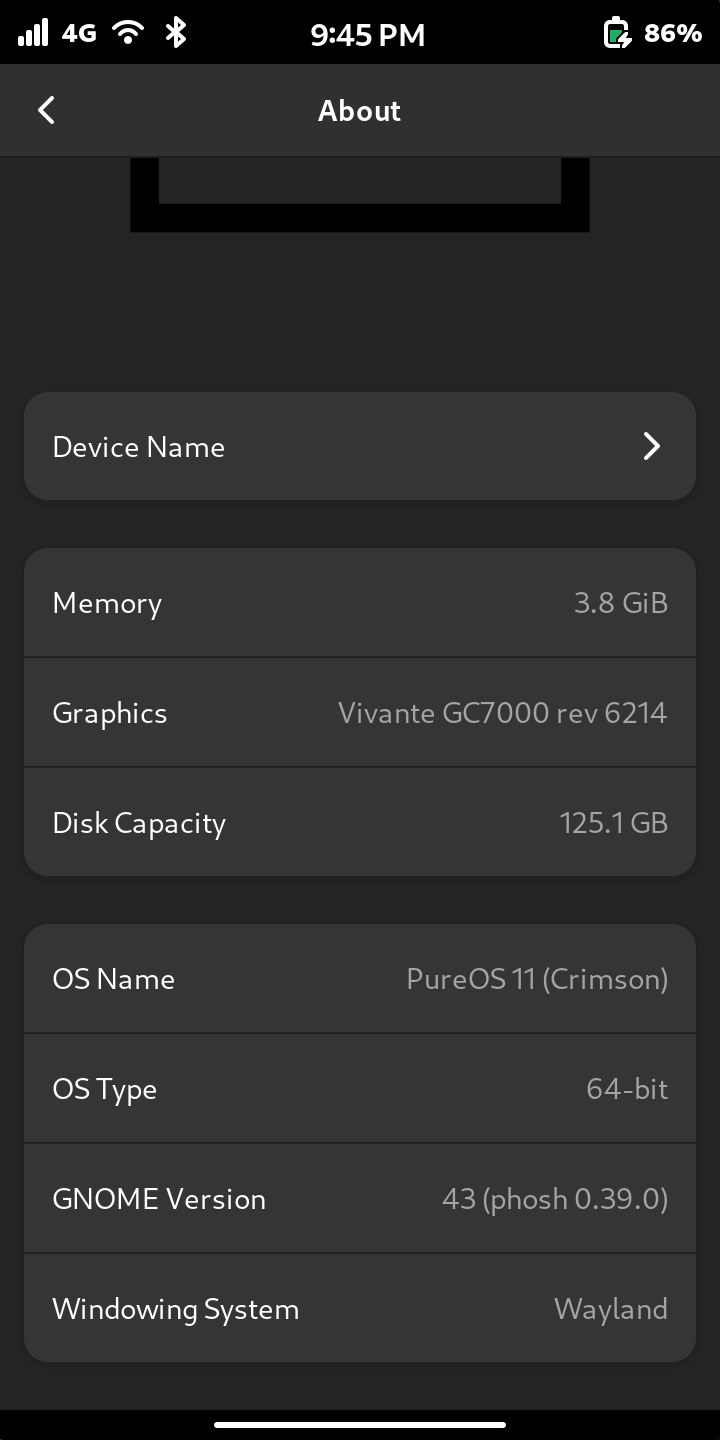
Yep that worked. Next is to purge the ones on the list that are old. Presume they are the ones that have “byz1” in their name, not the ones that have “cri1”.
It is unfortunate one has to be a cryptographer or a scrabble player to notice.
Yep that worked. Next is to purge the ones on the list that are old. Presume they are the ones that have “byz1” in their name, not the ones that have “cri1”.
It is unfortunate one has to be a cryptographer or a scrabble player to notice.
There’s no waiting involved, if you have latest byzantium updates applied it should be already installed on your phone, and if you don’t it will appear after updating (and this even includes a notification about new PureOS release on boot). If it does not, then something went wrong at some point.
There are other topics in this forum and there are hints in the Tips and Tricks page about cleaning up.
FWIW, when I have a whole lot of shell commands to do on the Librem 5, I will usually SSH in from another computer (that assumes that you have enabled, at least temporarily, the SSH server on the Librem 5 - which you can do from the Settings application).
Alternatively, you have the option at least of attaching an external keyboard to the USB port at the bottom of the phone. (That would typically require a USB-C M to USB-A F adapter.)
Just between you and me, as a hard-core shell command user, I think the “|” is in the wrong place on the keyboard layouts, as well as several other important shell characters, but if it bugged me too much, I guess I could work out how to move it e.g. an extra row of shell characters on the front keyboard (at a cost of occluding more screen real estate with the keyboard).
 (emoji text too short)
Well I cleaned it up. (Hand keyed from the L5 of course.) I got rid all but the latest that said “byz1” and some older version numbers that had no indicator. Funny thing, when you do the purges, it tells you 0MB will be used, not how much it will remove.
It’s fantastic news that Crimson is released, my great appreciation and thanks to the whole team!
I am also looking to install Crimson manually after the GUI tool identified several foreign packages. I did a --dry-run full upgrade just to be safe and look over the output and found this:
WARNING: The following essential packages will be removed.
This should NOT be done unless you know exactly what you are doing!
  librem5-gnome librem5-gnome-phone (due to librem5-gnome)
  chatty (due to librem5-gnome-phone)
Now I see further down the output that librem5-gnome-base will be installed, but I don’t see the same for Chatty.
Should I hold off upgrading or am I just being too cautious?
For some more context, I installed many of the Byzantium backports that were created and packaged by galilley in 2024. They’ve worked spectacularly for the past two years (for example being able to use the newer version 0.39.0 of Phosh, for all this time) but I always suspected I might run into issues once the official OS upgrade came along.
Along those lines I also noticed seven packages being kept back which I suspect stems from having utilized the backports:
The following packages have been kept back:
  gnome-control-center gnome-settings-daemon gnome-settings-daemon-common
  libinput-bin libinput10 libwacom-bin libwacom-common
If I were you, then rather than upgrade manually I’d rather downgrade all packages to versions from byzantium and only then attempt to perform the upgrade. There should be no packages kept back at all, and no removal of essential packages whatsoever.
Or backup what you need to backup and then reflash crimson from scratch for a guaranteed clean start.
And probably image the entire disk with Jumpdrive before you start any upgrade approach, in case something goes pear-shaped.
Thank you for the quick replies and advisement. I did create a .img backup with Disks using Jumpdrive as a precaution. Hopefully won’t be necessary to use.
I’m going to try installing those removed essential packages immediately after the upgrade
sudo apt full-upgrade && sudo apt install librem5-gnome librem5-gnome-phone chatty
and see if my concern is/was overblown. I’ll troubleshoot if any problems arise.
The default brightness is still dim so I have to take into a dark room to read it. There I found out the brightness slider is no longer under power settings. But the good news is the brightness slider is now under a downward swipe from the top, where the flashlight is.
It has been there for about 8 years now.
Sorry what I should have said is I had to go looking for it because I had been habitually using it under the “power” setting, and is no longer there. Now that I found it, it is one less swipe to use.
Well I’m happy to say that my worries were mostly undue. After a couple of hiccups including an unexpected restart mid-upgrade, necessitating a couple of apt --fix-broken install and dpkg --configure -a, and figuring out that a panic-inducing splash screen of
Oh no! Something has gone wrong. A problem has occurred and the system can’t recover. Please log out and try again.
was all due to Squeekboard somehow not being configured properly post-upgrade (solved with update-alternatives --config Phosh-OSK) I am now running PureOS 11 Crimson!
From what I can tell, it looks like the official OS versions of programs have caught up to the backports I had been using, the only exception being Chatty which is 0.8.0 now instead of 0.8.3
All the rest are either the same version or newer which is fantastic.
The only issue I’ve encountered is plugging into a dock to use a second display now crashes and restarts Phosh, which I think has been mentioned elsewhere. Other than that, works and looks great! Thanks again! 

All crashes related to (un)plugging external displays that I’ve been aware of have been fixed before the release, so you’re either not fully upgraded or you’re hitting an issue that I’ve never seen before. A few days ago I was giving a talk at a conference and I just plugged in my Librem 5 running plain crimson to the projector and it worked with no issues whatsoever.
SO you just mouse drag stuff over to the second dispaly or how does it work whith a touch device? I tried this a while ago and got a blank desktop area but was just testing the USB-C–>HDMI to try to rescue a broken android but apparently that tech is not included in most cheap android phones. Do you have a video of your confrence talk?
No video, but I usually use a Bluetooth touchpad to operate the phone when plugged to an external display. However, in this case I used a Steam Controller (the 2015 version), as not only it has a touchpad to control the pointer, but it also makes it convenient to switch slides while on the stage