I don’t know if it’s just mine but the Auto brightness drops the brightness to the minimum setting even if I’m outside in full sunlight, is it possible my sensor is defective?
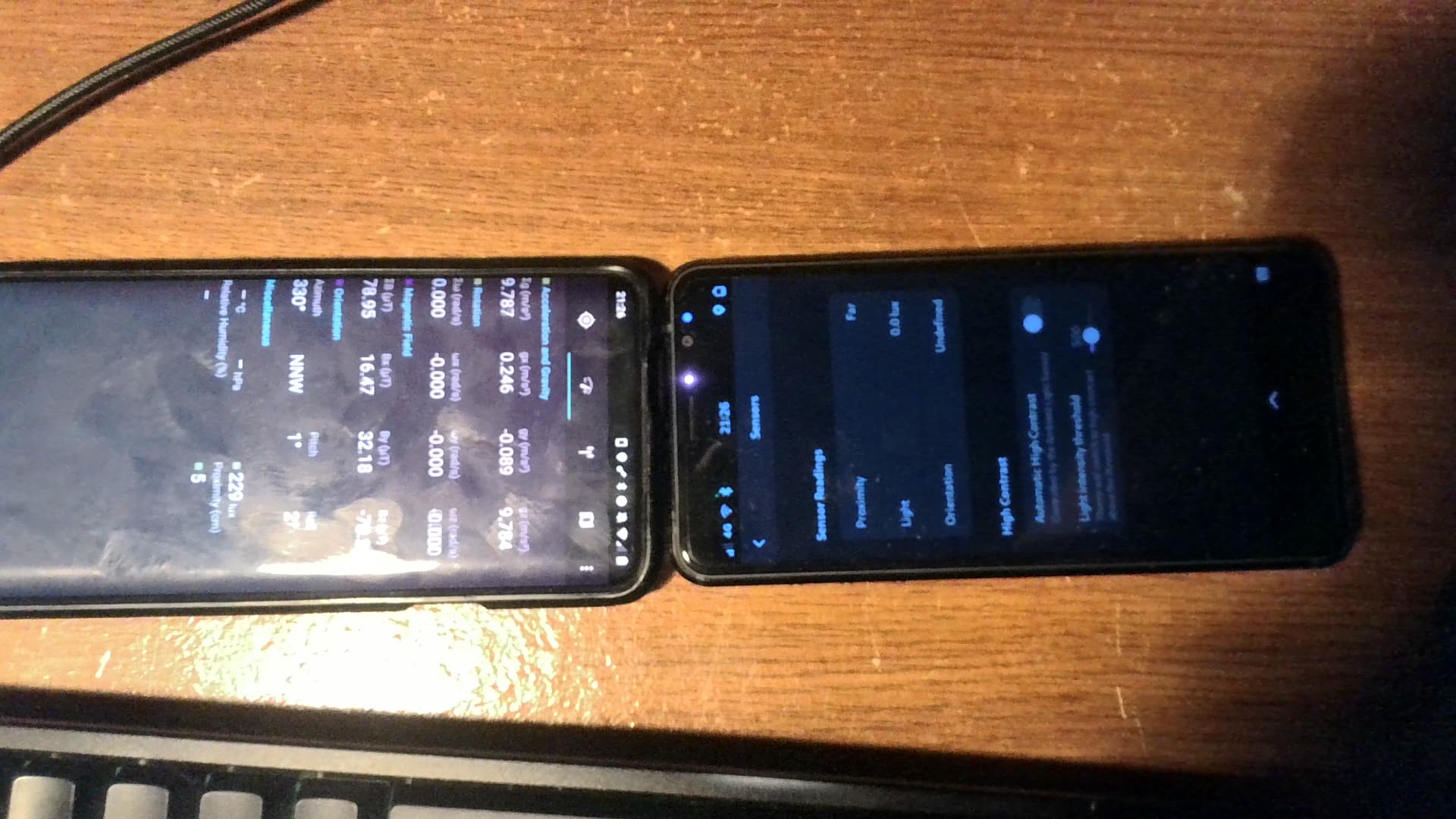
Lux reading comparison between my Librem 5 and my Android phone:
Is this real? Librem 5 has a light sensor? I’ve been using it for years and assumed it did not. It’ll be solid black in the sun and then I just mash my finger on the top imagining where the brightness slider is until I strike it and can see the screen.
Yes, it is real. It has an ambient light sensor. Frequently Asked Questions · Wiki · Librem5 / docs / Librem 5 Community Wiki · GitLab however the source of that diagram is me anyway so if you really want to check then you should look at the Librem 5 schematics.
Automatic brightness is helpful if you live in a bright sunny place and going outside can lead to immediate loss of readability of the screen otherwise.
I suppose it’s telling (though not sure of what) that I’ve known about the sensor, but haven’t seen it work/used in anything that I’d have recognized as automatic brightness. I too try to mash my fingers on the top occasionally. I assumed it was a feature that hadn’t been implemented, and that it might be maybe used to identify if the phone was next to an ear/head when calling (preventing accidental touch commands).
So, closer to original question: besides the sensor sensitivity, how can the autobrightness behavior be modified? I’d like to set min/max values (+50% or max at certain ambient brightness but also to have it at like 25% when in dark/night)) and preferably have different values for each use profile available. This seems more a phosh feature and indeed the 0.51.0 version release notes talk about several improvements… when we actually some day get that to L5.
Mobile Settings / Sensors / High Contrast
offers only “Light intensity threshold” and it explains only that “Theme will switch to high contrast above the threshold”. However that control does not appear to work properly for me.
And “contrast” is not the same as brightness.
I think the automatic brightness control may have disappeared - but it did need more work.
My understanding is that the proximity sensor is a different sensor.
Could be just one sensor - I was assuming that something like that might use multiple triggers.
One module that includes ambient light and proximity (IR emitter/receiver). Not clear whether ambient light is used as part of proximity.
I have the same problem. The sensor works, it jumps from nearly 0 lux to hundreds of lux when light hits it, which kinda makes the contrast option very annoying to use. If I am in a train or bus, sun hits it, the device stops for a second while the contrast settings change, then it goes back to normal back in the shade.
I’m in a quite well lit room and it still reads 0.0 lux and if I point it in the windowsill of the same room it goes from 0 to 110 instantly (it doesn’t get slowly brighter as I move closer to the window).
But after a lot of testing, the auto high contrast setting that works for me is 91. Very few incidents of fast switching and if I am under the bright sun, the screen actually goes high contrast and I get to be able to use my phone without removing my sunglasses. =)
Same here. The sensor or its driver seems to be trash, but which one of the two? Or does anyone know more?
There are apparently better settings coming with Dawn when phosh finally updates beyond 0.51.0 (as said before). Then the input from the sensor probably gets interpreted better what users want…
I never used the feature because it didn’t have sufficient hysteresis and fluctuated so abruptly and wasn’t very granular.
I’ve selected this as the solution because phosh 0.51.0+ is the long-term solution but I’ve* also thrown together a workaround:
This script (which unfortunately has to run as root) watches for the power button to be pressed twice in less than 2 seconds then kicks the brightness to maximum for 5 seconds:
#!/bin/bash -eu

# must run as root for evtest and /sys/class/backlight
if [ "$UID" != 0 ]; then
	echo "must run as root"
	exit 1
fi

# the power button
device='/dev/input/by-path/platform-30370000.snvs:snvs-powerkey-event'
last_event='0'

# there's only one key, and we're only counting keyup events
evtest "$device"  | grep --line-buffered -Po 'Event: time \K\d+(?=\.\d+, type 1 \(EV_KEY\), code 116 \(KEY_POWER\), value 0)' | while read -r this_event; do
	# if the button has been pressed twice within 2 seconds
	if [ "$last_event" -ge $(( this_event - 1 )) ]; then
		for (( i=10 ; i ; i--)); do
			echo 250 > /sys/class/backlight/backlight-dsi/brightness
			sleep 0.5s
		done
	else
		last_event="$this_event"
	fi
done
I “installed” it to my L5 by saving that script to /usr/local/bin/brightness_workaround.sh, saving this service file to /etc/systemd/service/brightness_workaround.service:
[Unit]
Wants=graphical.target
After=graphical.target

[Service]
ExecStart=/usr/local/bin/brightness_workaround.sh

[Install]
WantedBy=graphical.target
then running sudo systemctl enable brightness_workaround.service && sudo systemctl start brightness_workaround.service
*:
100% human generated, no AI here