I think my modem may have died yesterday, but would appreciate some help diagnosing/troubleshooting.
I plan to email support@puri.sm, but I figure it’s the weekend and asking here might get a quicker response before Monday.
OS: Crimson, up to date
Carrier: Mint Mobile in the northeast USA
Modem: BM818-A1
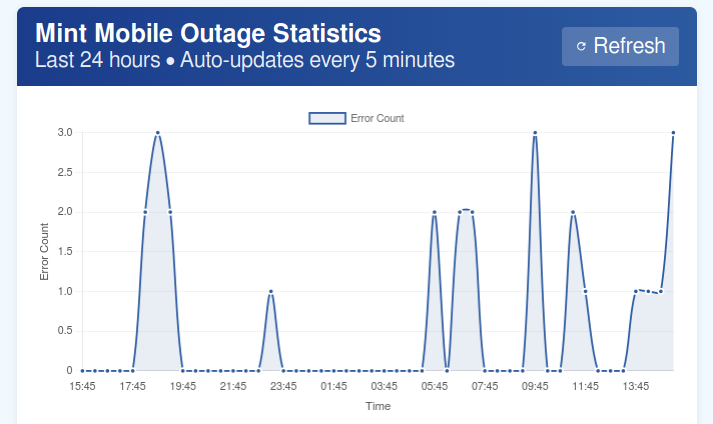
To sum it up, my phone hasn’t been able to get solid cell connection for about 24 hours now. (Except for about 2 minutes while on a drive to receive an MMS, then gone again).
It seems to have problems connecting to Mint, and instead of saying T-Mobile in the Quick Settings, the carrier keeps switching between AT&T and Verizon every few minutes. Sometimes it says the carrier “331 003” or something like that.
I was able to get through to a Mint Mobile rep on the phone, and they decided the reason it stopped working was because T-Mobile is taking down 2G towers and they said the L5 only supports 2G. I mentioned to them that their info might be a bit out of date.
Anyways, here’s what I’ve tried with the phone:
- Multiple reboots and removal/re-insert of battery, as well as HKS switching and SW switch toggling.
- Powering off the phone, removing the SIM, waiting a bit, reinserting, restarting.
- I tried pushing in the connections on the wires on the modem. They seemed fine to begin with, however.
- Changing my APN in GNOME Settings to
Mint/Wholesale. It had defaulted before to I think wireless.dish.com or something similar. I’ll probably change this back. - GNOME Settings modem info lists:
- Carrier: Whatever my phone decides it wants to connect to at that moment
- Network type: lte
- Signal strength: 41% (in my basement typing this)
- Network Status: Roaming (probably due to it saying I’m on VErizon at this second)
- Manufacturer: Qualcomm
- Model: 0
- Firmware Version: MPSS.JO.2.0.2.c1.1-00032-9607_GENSS_PACK-1.351938.1 …
- dmesg and journalctl have some scary stuff that makes me worry my modem is indeed a goner. Here is
journalctl -fafter powering the modem on from HKS off. It connected to T-Mobile first, sat for a few minutes, then switched to say AT&T around theAug 08 14:52:32timestamp.
Aug 08 14:50:32 voyager systemd[1]: Starting systemd-rfkill.service - Load/Save RF Kill Switch Status...
Aug 08 14:50:32 voyager systemd[1]: Started systemd-rfkill.service - Load/Save RF Kill Switch Status.
Aug 08 14:50:32 voyager NetworkManager[542]: <info>  [1786215032.2787] manager: rfkill: WWAN now enabled by radio killswitch
Aug 08 14:50:37 voyager systemd[1]: systemd-rfkill.service: Deactivated successfully.
Aug 08 14:50:38 voyager kernel: usb 1-1.2: new high-speed USB device number 9 using xhci-hcd
Aug 08 14:50:39 voyager kernel: usb 1-1.2: New USB device found, idVendor=2020, idProduct=2060, bcdDevice= 0.00
Aug 08 14:50:39 voyager kernel: usb 1-1.2: New USB device strings: Mfr=3, Product=2, SerialNumber=4
Aug 08 14:50:39 voyager kernel: usb 1-1.2: Product: Qualcomm CDMA Technologies MSM
Aug 08 14:50:39 voyager kernel: usb 1-1.2: Manufacturer: Qualcomm, Incorporated
Aug 08 14:50:39 voyager kernel: usb 1-1.2: Device is not authorized for usage
Aug 08 14:50:39 voyager usbguard-daemon[665]: uid=0 pid=585 result='SUCCESS' device.rule='block id 2020:2060 serial "" name "Qualcomm CDMA Technologies MSM" hash "1E5MUAqBN4Iq7aIBy9C66mfhsybxqVMgqb0Zo2g0vPw=" parent-hash "vcQCvo7og/OsiyjGJkBpBhxttJR/CC2E95j94p5kh0I=" via-port "1-1.2" with-interface { ff:ff:ff ff:ff:ff ff:ff:ff ff:fe:ff ff:ff:ff } with-connect-type "not used"' device.system_name='/devices/platform/soc@0/38200000.usb/xhci-hcd.4.auto/usb1/1-1/1-1.2' type='Device.Insert'
Aug 08 14:50:39 voyager kernel: option 1-1.2:1.0: GSM modem (1-port) converter detected
Aug 08 14:50:39 voyager kernel: usb 1-1.2: GSM modem (1-port) converter now attached to ttyUSB0
Aug 08 14:50:39 voyager kernel: option 1-1.2:1.1: GSM modem (1-port) converter detected
Aug 08 14:50:39 voyager kernel: usb 1-1.2: GSM modem (1-port) converter now attached to ttyUSB1
Aug 08 14:50:39 voyager kernel: option 1-1.2:1.2: GSM modem (1-port) converter detected
Aug 08 14:50:39 voyager kernel: usb 1-1.2: GSM modem (1-port) converter now attached to ttyUSB2
Aug 08 14:50:39 voyager kernel: option 1-1.2:1.3: GSM modem (1-port) converter detected
Aug 08 14:50:39 voyager kernel: usb 1-1.2: GSM modem (1-port) converter now attached to ttyUSB3
Aug 08 14:50:39 voyager kernel: qmi_wwan 1-1.2:1.4: cdc-wdm0: USB WDM device
Aug 08 14:50:39 voyager kernel: qmi_wwan 1-1.2:1.4 wwan0: register 'qmi_wwan' at usb-xhci-hcd.4.auto-1.2, WWAN/QMI device, e2:c5:9d:ab:e3:53
Aug 08 14:50:39 voyager kernel: usb 1-1.2: authorized to connect
Aug 08 14:50:39 voyager usbguard-daemon[665]: uid=0 pid=585 result='SUCCESS' device.system_name='/devices/platform/soc@0/38200000.usb/xhci-hcd.4.auto/usb1/1-1/1-1.2' target.new='allow' device.rule='block id 2020:2060 serial "" name "Qualcomm CDMA Technologies MSM" hash "1E5MUAqBN4Iq7aIBy9C66mfhsybxqVMgqb0Zo2g0vPw=" parent-hash "vcQCvo7og/OsiyjGJkBpBhxttJR/CC2E95j94p5kh0I=" via-port "1-1.2" with-interface { ff:ff:ff ff:ff:ff ff:ff:ff ff:fe:ff ff:ff:ff } with-connect-type "not used"' target.old='block' type='Policy.Device.Update'
Aug 08 14:50:39 voyager usbguard-daemon[665]: Ignoring unknown UEvent action: sysfs_devpath=/devices/platform/soc@0/38200000.usb/xhci-hcd.4.auto/usb1/1-1/1-1.2 action=change
Aug 08 14:50:39 voyager mtp-probe[8157]: checking bus 1, device 9: "/sys/devices/platform/soc@0/38200000.usb/xhci-hcd.4.auto/usb1/1-1/1-1.2"
Aug 08 14:50:39 voyager mtp-probe[8157]: bus: 1, device: 9 was not an MTP device
Aug 08 14:50:39 voyager mtp-probe[8159]: checking bus 1, device 9: "/sys/devices/platform/soc@0/38200000.usb/xhci-hcd.4.auto/usb1/1-1/1-1.2"
Aug 08 14:50:39 voyager mtp-probe[8159]: bus: 1, device: 9 was not an MTP device
Aug 08 14:50:41 voyager ModemManager[649]: <info>  [device /sys/devices/platform/soc@0/38200000.usb/xhci-hcd.4.auto/usb1/1-1/1-1.2] creating modem with plugin 'broadmobi' and '6' ports
Aug 08 14:50:41 voyager ModemManager[649]: <info>  [base-manager] modem for device '/sys/devices/platform/soc@0/38200000.usb/xhci-hcd.4.auto/usb1/1-1/1-1.2' successfully created
Aug 08 14:50:42 voyager ModemManager[649]: <warn>  [modem5] couldn't query SIM slots: QMI protocol error (94): 'NotSupported'
Aug 08 14:50:42 voyager ModemManager[649]: <warn>  [modem5/sim5] couldn't load GID2: Couldn't read data from UIM: QMI protocol error (16): 'NotProvisioned'
Aug 08 14:50:42 voyager ModemManager[649]: <info>  [modem5] state changed (unknown -> disabled)
Aug 08 14:50:42 voyager mmsdtng[754]: New Object with Messaging feature found, Adding...
Aug 08 14:50:42 voyager NetworkManager[542]: <info>  [1786215042.4328] manager: (cdc-wdm0): new Broadband device (/org/freedesktop/NetworkManager/Devices/12)
Aug 08 14:50:42 voyager NetworkManager[542]: <info>  [1786215042.4390] device (cdc-wdm0): state change: unmanaged -> unavailable (reason 'managed', sys-iface-state: 'external')
Aug 08 14:50:42 voyager NetworkManager[542]: <info>  [1786215042.4406] device (cdc-wdm0): modem state 'enabling'
Aug 08 14:50:42 voyager NetworkManager[542]: <info>  [1786215042.4456] device (cdc-wdm0): state change: unavailable -> disconnected (reason 'none', sys-iface-state: 'managed')
Aug 08 14:50:42 voyager ModemManager[649]: <info>  [modem5] state changed (disabled -> enabling)
Aug 08 14:50:42 voyager ModemManager[649]: <info>  [modem5] power state updated: on
Aug 08 14:50:42 voyager gnome-calls[1157]: Failed to get 3gpp location service: GDBus.Error:org.freedesktop.ModemManager1.Error.Core.WrongState: Cannot get location: device not yet enabled
Aug 08 14:50:42 voyager ModemManager[649]: <info>  [modem5] state changed (enabling -> enabled)
Aug 08 14:50:42 voyager ModemManager[649]: <info>  [modem5] 3GPP registration state changed (unknown -> registering)
Aug 08 14:50:42 voyager ModemManager[649]: <info>  [modem5] 3GPP registration state changed (registering -> home)
Aug 08 14:50:42 voyager ModemManager[649]: <info>  [modem5] state changed (enabled -> registered)
Aug 08 14:50:45 voyager systemd[1]: systemd-timedated.service: Deactivated successfully.
Aug 08 14:51:07 voyager gnome-calls[1157]: Could not query call waiting status: Timeout was reached
Aug 08 14:51:31 voyager systemd[1]: pcscd.service: Deactivated successfully.
Aug 08 14:51:33 voyager NetworkManager[542]: <info>  [1786215093.1649] policy: auto-activating connection 'Mint' (ae71c70d-3250-4678-b70e-c9c3aafd4892)
Aug 08 14:51:33 voyager NetworkManager[542]: <info>  [1786215093.1692] device (cdc-wdm0): Activation: starting connection 'Mint' (ae71c70d-3250-4678-b70e-c9c3aafd4892)
Aug 08 14:51:33 voyager NetworkManager[542]: <info>  [1786215093.1702] device (cdc-wdm0): state change: disconnected -> prepare (reason 'none', sys-iface-state: 'managed')
Aug 08 14:51:33 voyager ModemManager[649]: <info>  [modem5] simple connect started...
Aug 08 14:51:33 voyager ModemManager[649]: <info>  [modem5] simple connect state (6/10): register
Aug 08 14:51:33 voyager ModemManager[649]: <info>  [modem5] simple connect state (7/10): wait to get packet service state attached
Aug 08 14:51:33 voyager ModemManager[649]: <info>  [modem5] simple connect state (8/10): bearer
Aug 08 14:51:33 voyager ModemManager[649]: <info>  [modem5] simple connect state (9/10): connect
Aug 08 14:51:33 voyager ModemManager[649]: <info>  [modem5] state changed (registered -> connecting)
Aug 08 14:51:33 voyager ModemManager[649]: <info>  [modem5/bearer17] QMI IPv4 Settings:
Aug 08 14:51:33 voyager ModemManager[649]: <info>  [modem5/bearer17]     address: 33.220.240.182/30
Aug 08 14:51:33 voyager ModemManager[649]: <info>  [modem5/bearer17]     gateway: 33.220.240.181
Aug 08 14:51:33 voyager ModemManager[649]: <info>  [modem5/bearer17]     DNS #1: 10.177.0.34
Aug 08 14:51:33 voyager ModemManager[649]: <info>  [modem5/bearer17]     DNS #2: 10.177.0.210
Aug 08 14:51:33 voyager ModemManager[649]: <info>  [modem5/bearer17]        MTU: 1500
Aug 08 14:51:33 voyager ModemManager[649]: <info>  [modem5/bearer17] couldn't start network: QMI protocol error (14): 'CallFailed'
Aug 08 14:51:33 voyager ModemManager[649]: <info>  [modem5/bearer17] verbose call end reason (3,1110): [cm] (null)
Aug 08 14:51:33 voyager ModemManager[649]: <info>  [modem5/bearer17] reloading stats is supported by the device
Aug 08 14:51:33 voyager ModemManager[649]: <info>  [modem5] state changed (connecting -> connected)
Aug 08 14:51:33 voyager ModemManager[649]: <info>  [modem5] simple connect state (10/10): all done
Aug 08 14:51:33 voyager NetworkManager[542]: <info>  [1786215093.3711] device (cdc-wdm0): state change: prepare -> config (reason 'none', sys-iface-state: 'managed')
Aug 08 14:51:33 voyager NetworkManager[542]: <info>  [1786215093.3754] device (cdc-wdm0): state change: config -> ip-config (reason 'none', sys-iface-state: 'managed')
Aug 08 14:51:33 voyager NetworkManager[542]: <info>  [1786215093.3807] modem-broadband[cdc-wdm0]: IPv4 static configuration:
Aug 08 14:51:33 voyager NetworkManager[542]: <info>  [1786215093.3808] modem-broadband[cdc-wdm0]:   address 33.220.240.182/30 brd* 33.220.240.183 lft forever pref forever lifetime 8348-0[0,0] src wwan
Aug 08 14:51:33 voyager NetworkManager[542]: <info>  [1786215093.3809] modem-broadband[cdc-wdm0]:   gateway 33.220.240.181
Aug 08 14:51:33 voyager NetworkManager[542]: <info>  [1786215093.3809] modem-broadband[cdc-wdm0]:   DNS 10.177.0.34
Aug 08 14:51:33 voyager NetworkManager[542]: <info>  [1786215093.3809] modem-broadband[cdc-wdm0]:   DNS 10.177.0.210
Aug 08 14:51:33 voyager NetworkManager[542]: <info>  [1786215093.3810] modem-broadband[cdc-wdm0]:   MTU 1500
Aug 08 14:51:33 voyager NetworkManager[542]: <warn>  [1786215093.3811] device (cdc-wdm0): retrieving IP configuration failed: modem IP method unsupported
Aug 08 14:51:33 voyager systemd-resolved[509]: wwan0: Bus client set default route setting: no
Aug 08 14:51:33 voyager NetworkManager[542]: <info>  [1786215093.4274] device (cdc-wdm0): state change: ip-config -> ip-check (reason 'none', sys-iface-state: 'managed')
Aug 08 14:51:33 voyager systemd[1]: Starting NetworkManager-dispatcher.service - Network Manager Script Dispatcher Service...
Aug 08 14:51:33 voyager systemd[1]: Started NetworkManager-dispatcher.service - Network Manager Script Dispatcher Service.
Aug 08 14:51:33 voyager NetworkManager[542]: <info>  [1786215093.5181] device (cdc-wdm0): state change: ip-check -> secondaries (reason 'none', sys-iface-state: 'managed')
Aug 08 14:51:33 voyager NetworkManager[542]: <info>  [1786215093.5187] device (cdc-wdm0): state change: secondaries -> activated (reason 'none', sys-iface-state: 'managed')
Aug 08 14:51:33 voyager NetworkManager[542]: <info>  [1786215093.5203] device (cdc-wdm0): Activation: successful, device activated.
Aug 08 14:51:43 voyager systemd[1]: NetworkManager-dispatcher.service: Deactivated successfully.
Aug 08 14:51:57 voyager phosh[1039]: Moved 'org.gnome.Calls.desktop' to transient systemd unit
Aug 08 14:51:57 voyager systemd[697]: Started app-gnome-org.gnome.Calls-8303.scope - Application launched by phosh.
Aug 08 14:51:59 voyager ModemManager[649]: <info>  [modem5] 3GPP registration state changed (home -> registering)
Aug 08 14:51:59 voyager ModemManager[649]: <info>  [modem5] 3GPP registration state changed (registering -> home)
Aug 08 14:52:32 voyager ModemManager[649]: <info>  [modem5] 3GPP registration state changed (home -> unknown)
Aug 08 14:52:32 voyager ModemManager[649]: <warn>  [modem5] network reject indication received
Aug 08 14:52:32 voyager ModemManager[649]: <warn>  [modem5]   service domain: ps
Aug 08 14:52:32 voyager ModemManager[649]: <warn>  [modem5]   radio interface: lte
Aug 08 14:52:32 voyager ModemManager[649]: <warn>  [modem5]   reject cause: ue-identity-not-derived-by-network
Aug 08 14:52:32 voyager ModemManager[649]: <info>  [modem5] 3GPP registration state changed (unknown -> registering)
Aug 08 14:52:32 voyager ModemManager[649]: <info>  [modem5] 3GPP registration state changed (registering -> roaming)
Aug 08 14:52:32 voyager ModemManager[649]: <info>  [modem5] state changed (connected -> disconnecting)
Aug 08 14:52:32 voyager ModemManager[649]: <info>  [modem5] state changed (disconnecting -> registered)
Aug 08 14:52:32 voyager NetworkManager[542]: <info>  [1786215152.1153] device (cdc-wdm0): state change: activated -> failed (reason 'modem-no-carrier', sys-iface-state: 'managed')
Aug 08 14:52:32 voyager ModemManager[649]: <info>  [modem5/bearer17] connection #1 finished: duration 58s, tx: 0 bytes, rx: 0 bytes
Aug 08 14:52:32 voyager NetworkManager[542]: <warn>  [1786215152.1214] device (cdc-wdm0): Activation: failed for connection 'Mint'
Aug 08 14:52:32 voyager NetworkManager[542]: <info>  [1786215152.1251] device (cdc-wdm0): state change: failed -> disconnected (reason 'none', sys-iface-state: 'managed')
Aug 08 14:52:32 voyager systemd[1]: Starting NetworkManager-dispatcher.service - Network Manager Script Dispatcher Service...
Aug 08 14:52:32 voyager NetworkManager[542]: <info>  [1786215152.2067] policy: auto-activating connection 'Mint' (ae71c70d-3250-4678-b70e-c9c3aafd4892)
Aug 08 14:52:32 voyager NetworkManager[542]: <info>  [1786215152.2086] device (cdc-wdm0): Activation: starting connection 'Mint' (ae71c70d-3250-4678-b70e-c9c3aafd4892)
Aug 08 14:52:32 voyager NetworkManager[542]: <info>  [1786215152.2089] device (cdc-wdm0): state change: disconnected -> prepare (reason 'none', sys-iface-state: 'managed')
Aug 08 14:52:32 voyager ModemManager[649]: <info>  [modem5] simple connect started...
Aug 08 14:52:32 voyager ModemManager[649]: <info>  [modem5] simple connect state (6/10): register
Aug 08 14:52:32 voyager ModemManager[649]: <info>  [modem5] simple connect state (7/10): wait to get packet service state attached
Aug 08 14:52:32 voyager systemd[1]: Started NetworkManager-dispatcher.service - Network Manager Script Dispatcher Service.
Aug 08 14:52:32 voyager ModemManager[649]: <warn>  [modem5] network reject indication received
Aug 08 14:52:32 voyager ModemManager[649]: <warn>  [modem5]   service domain: cs-ps
Aug 08 14:52:32 voyager ModemManager[649]: <warn>  [modem5]   radio interface: lte
Aug 08 14:52:32 voyager ModemManager[649]: <warn>  [modem5]   reject cause: roaming-in-location-area-not-allowed
Aug 08 14:52:32 voyager ModemManager[649]: <info>  [modem5] 3GPP registration state changed (roaming -> searching)
Aug 08 14:52:32 voyager ModemManager[649]: <info>  [modem5] state changed (registered -> searching)
Aug 08 14:52:42 voyager ModemManager[649]: <info>  [modem5] simple connect started...
Aug 08 14:52:42 voyager ModemManager[649]: <info>  [modem5] simple connect state (4/10): wait to get fully enabled
Aug 08 14:52:42 voyager ModemManager[649]: <info>  [modem5] simple connect state (5/10): wait after enabled
Aug 08 14:52:42 voyager systemd[1]: NetworkManager-dispatcher.service: Deactivated successfully.
Aug 08 14:52:42 voyager ModemManager[649]: <info>  [modem5] simple connect state (6/10): register
Aug 08 14:52:59 voyager ModemManager[649]: <info>  [modem5] 3GPP registration state changed (searching -> unknown)
Aug 08 14:52:59 voyager ModemManager[649]: <info>  [modem5] state changed (searching -> enabled)