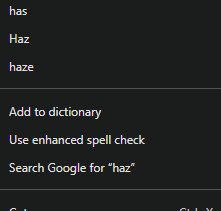
Spell check doesn’t recognize “cystoscopy”.
It is the correct spelling, so I would want to add it to my dictionary.
SUMMARY:
How do I use the keyboard to correct spelling without looking it up on a search engine or Google to find correct spelling to change or cut & paste to correct spelling just as one might do in in thiz post?
FWIW, spell check is happy with cystoscopy for me i.e. no red squiggly underline. Firefox on desktop. And, no, I have not added that word to my local dictionary. My local dictionary contains just 20 or so words.
Please confirm
that you are definitely talking about the Librem 5 as platform and, if so, whether running byzantium or crimson
what browser you are using
what version the browser is
what environment the screenshot that you included is from
While I don’t frequently add a word to the dictionary, I believe this functionality (in Firefox on desktop) works exactly as you would expect i.e. just click “Add to dictionary”. Or click one of the offered alternatives if the word as entered was indeed a typo for one of the offered alternatives.
Well for me (Firefox on desktop) it is offering to “ask an AI chatbot” instead, which may be equally unappealing. I don’t know whether there are any configured AI chatbots though. It may also depend on what the default search engine is (which for me would never be Google).
I don’t see it on L5. I made the suggestion. In detail. it was a suggestion to either do a search using a search engine, or for the Googies, to use Google. I resorted to using my desktop to capture the image I showed (above). I can’t ever remember the L5 suggesting anything.
But I did use Google to search puri.sm with the phrase “purism l5 how to use spell checker” and it coughed up:
Open Settings: Swipe up on the home screen and tap the Settings gear icon.
Navigate to OSK Settings: Scroll down and select the OSK (On-Screen Keyboard) panel.
Enable Opportunistic Completion: Look for and enable the option labeled “opportunistic completion”.
Use the Feature: Once enabled, the keyboard will display suggested words above the typing area whenever an application indicates that word completion would be useful. You can tap on a suggested word to insert it.
Toggle from Keyboard: If the option “Toggle via OSK menu” is enabled, you can also access the completion menu from the “world menu” (language menu) within the keyboard itself.
This feature is particularly useful when typing in languages with complex spellings.
So sayeth Google - Based on it’s AI search of Puri. But, like 99.99% (IMO) of search results, it is outdated. Looks good from Step 1 and that’s it. There is no ‘Settings > OSK Settings’ to click on.
Don’t cha just go red when working through steps by steps that near the end of any number of steps, somewhere a step says to do something, that isn’t there
So I am assuming you are talking not about Discourse but rather other places native to the phone where you want spellchecker, right? In Chatty if you click menu in the actions view in the terminal keyboard, it will show the list of words that could replace the word you misspelled. In future versions I hope this is being worked on to make easier to find.