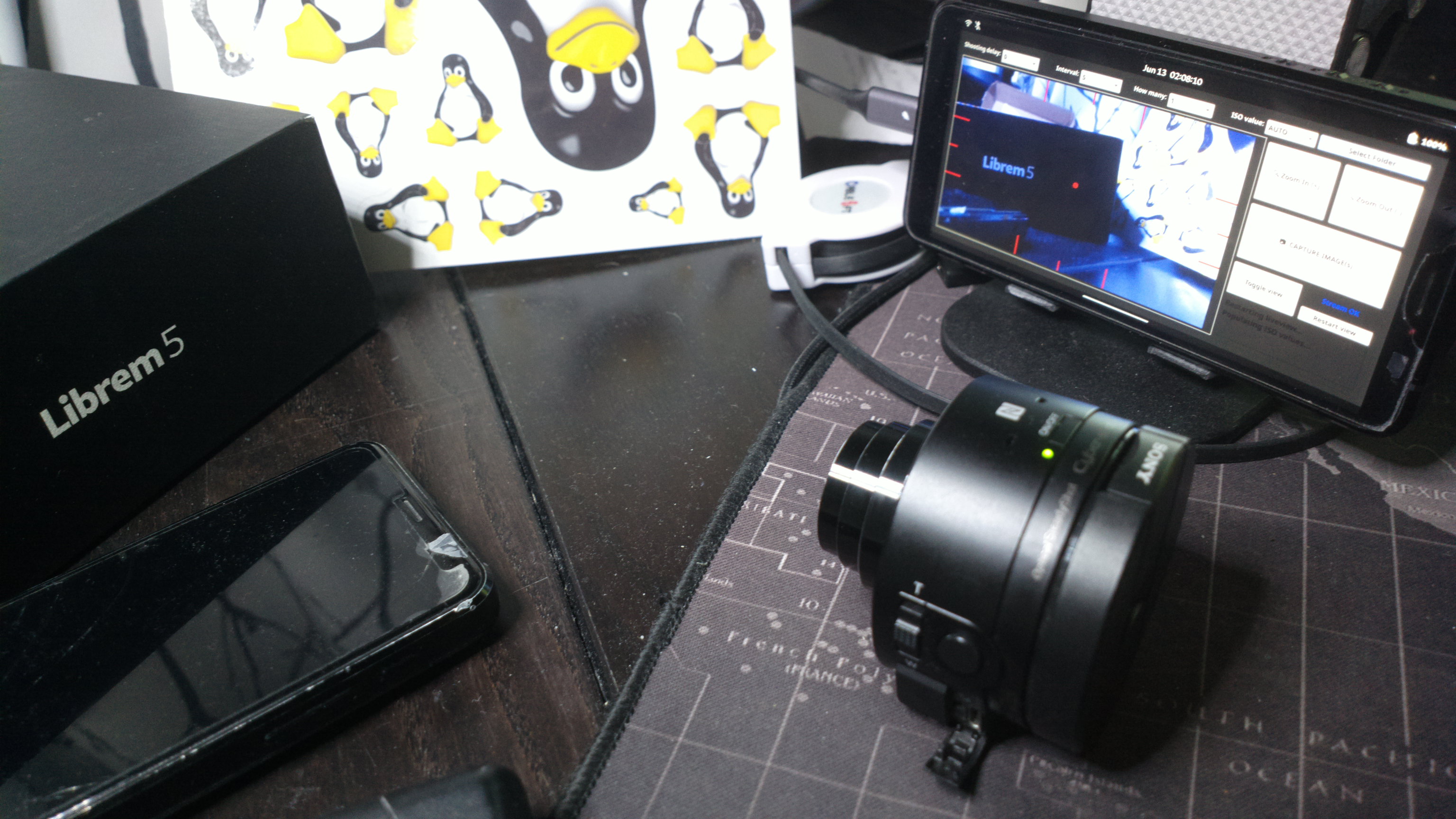
I played around with that old PoC for a while but not got some time in my hands and polished the script enough to dare paste it for anyone to use (the polishing part was an interesting one as I’ve never worked with python and now it’s gone from 381 lines and 15729 characters to 1158 and 51250 with comments). If anyone wants a camera user interface that’s made for and tested to work with Librem 5 (testing is ongoing and it’s likely I’ll edit and tweak this post in the coming days), here’s one, although it should run in other (linux) phones too. It’s easy to run when you set up a .desktop and an icon to sun it like any normal GUI app, you just have to have the camera connected via wifi first and preferably set zoom to 150% and use Mobile-Settings compositor setting on it.
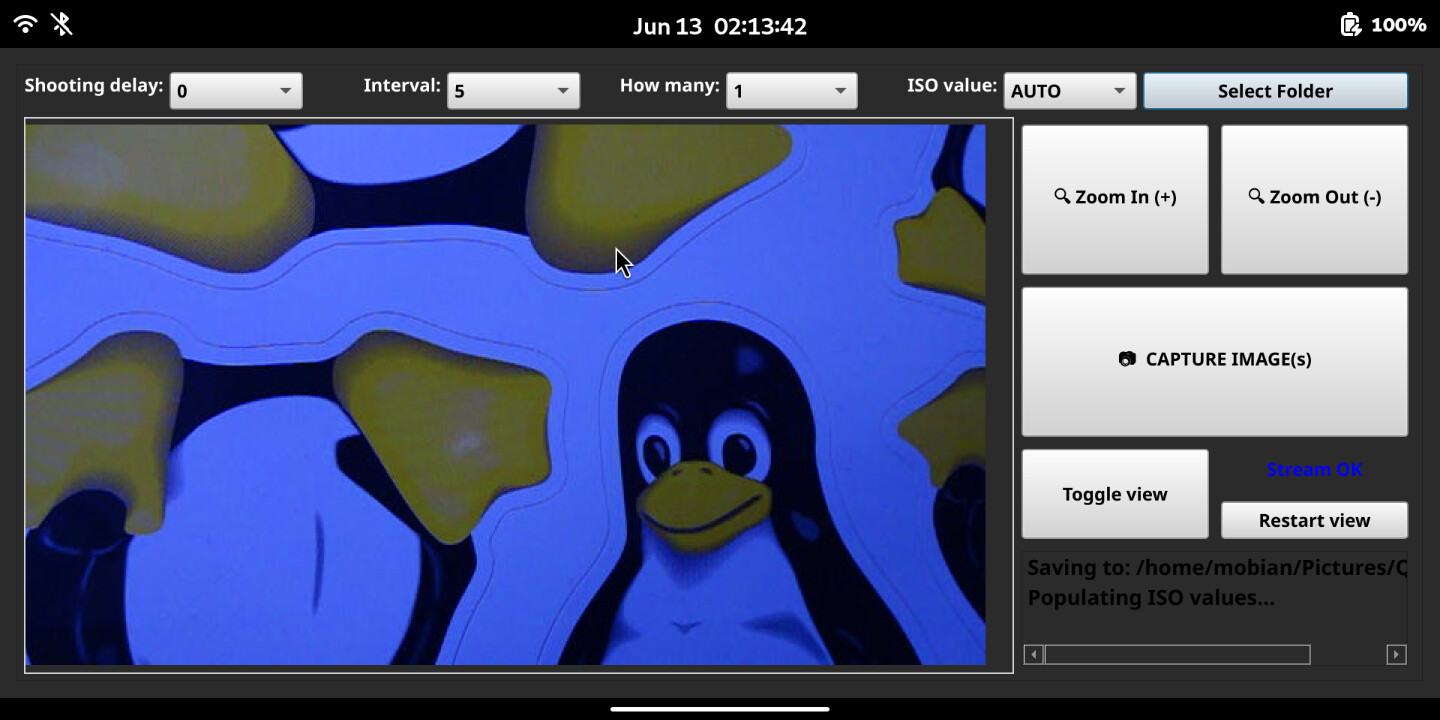
This QX-Cam script got zooms and ISO values. I added a toggle for helper sights and center dot. There are options for timedelays, intervals and and how many pics you want the camera to take (while you go for some tea or something). And based on some old thread here, I even made a more complicated save folder setting dialog and file renaming to my liking. And a bunch of checks and warnings, so you get feedback from it. Script code is at the end fo this post.
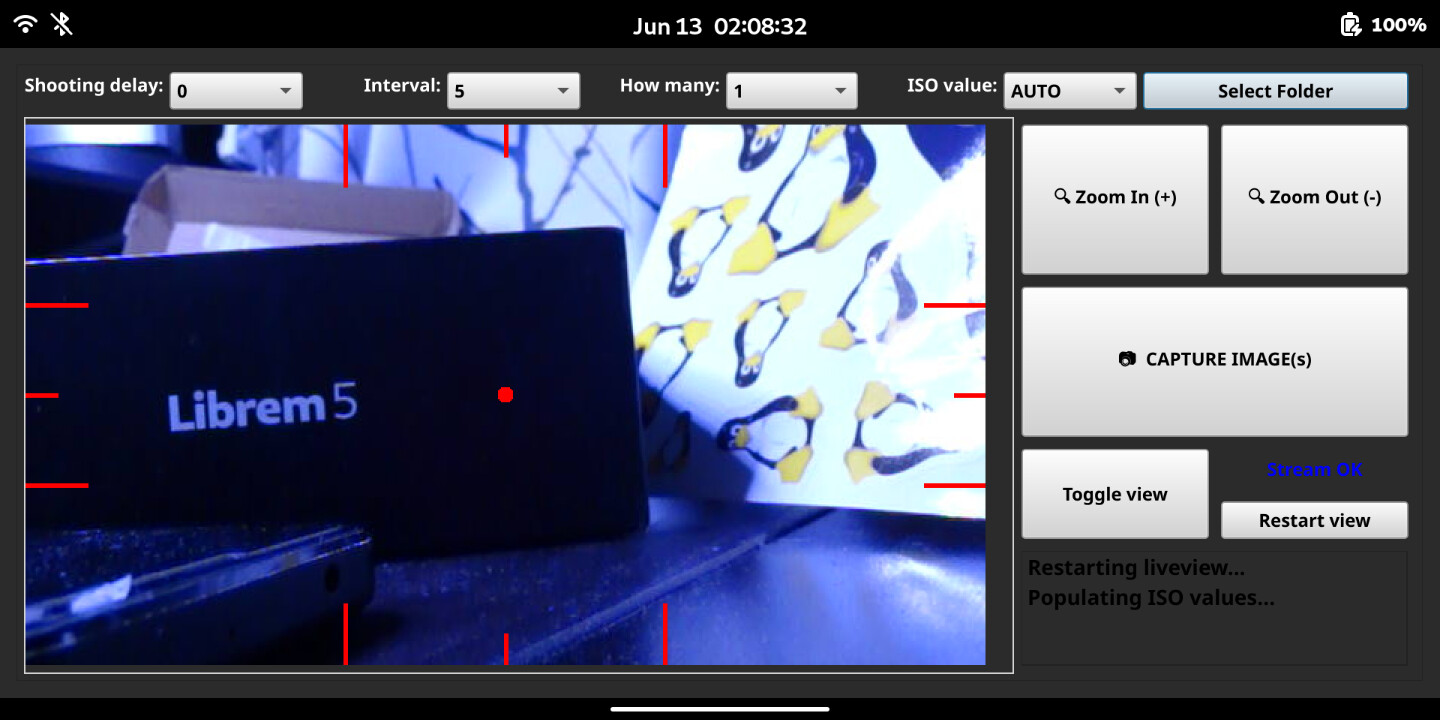
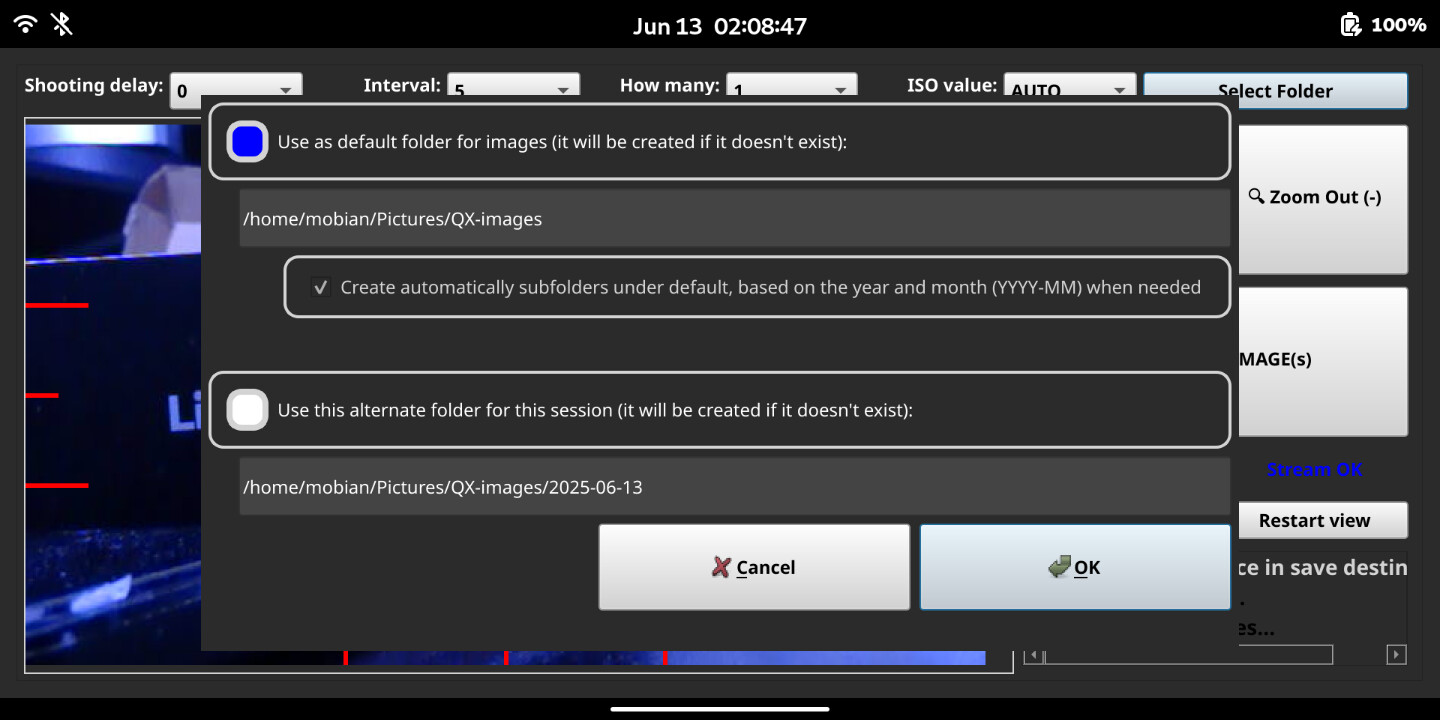
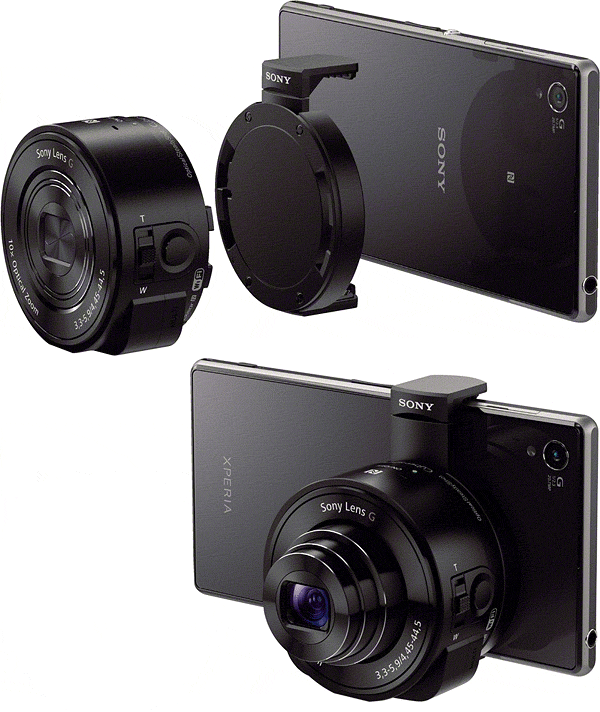
It’s definitely better quality cam than the one in the phone, but it’s a bit slow due to the wifi/http-based connection (5m between cam and phone seems possible). I may start a “fork” of this later on to explore alternatives. This is intentionally just a straight forward camera with a layout that has buttons that adult fingers should easily use. It’s just for landscape use (havent’ implemented portrait mode rotation or anything like that).
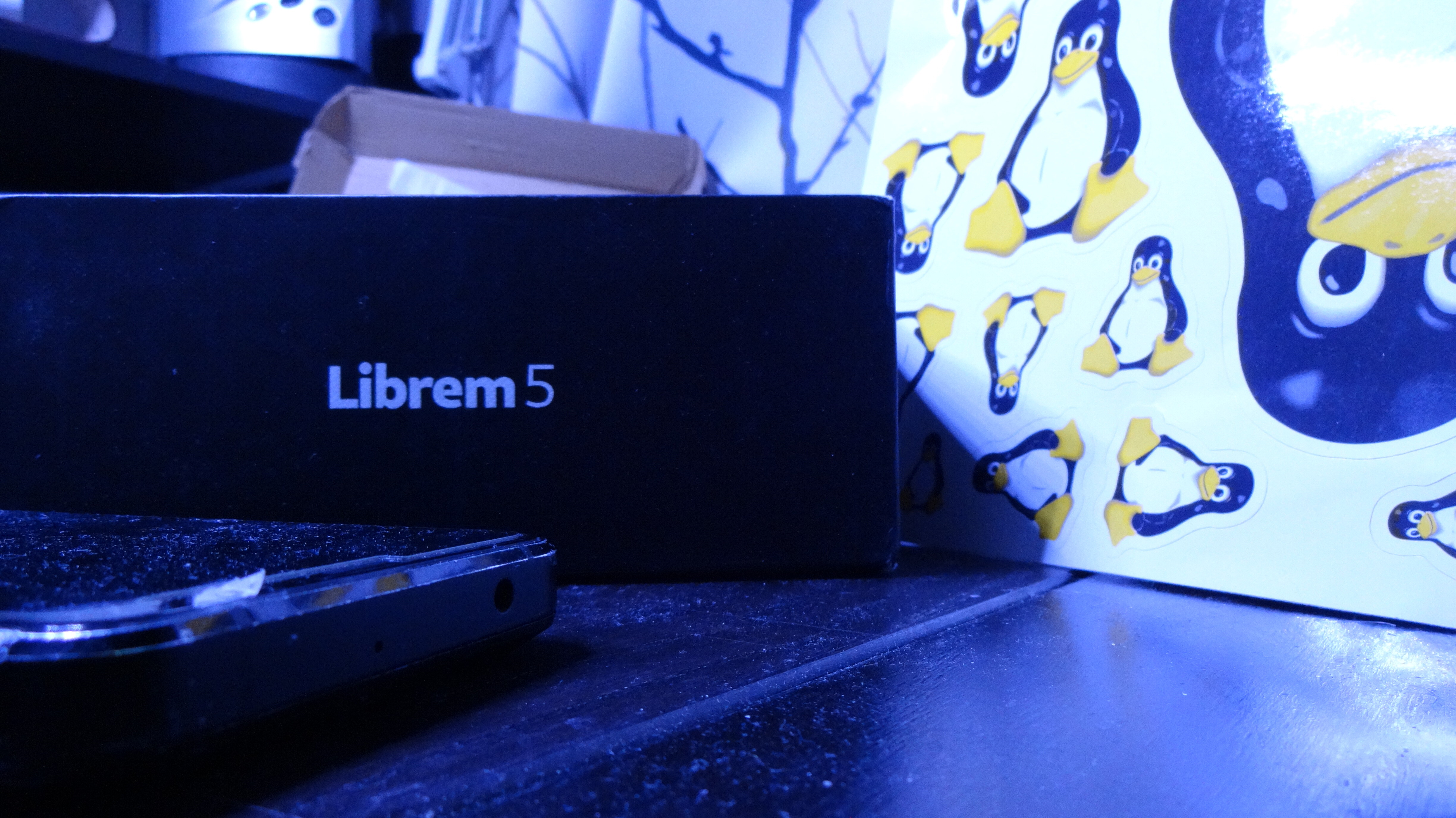
(the lighting on my desktop was bad, that’s why it looks a bit blue)
Script code here
#!/usr/bin/env python3
# QX-Cam is a script for a simple camera GUI for using Sony QX10 or QX100 from touch screen of Librem5 linux phone (https://puri.sm/products/librem-5/) by JR-Fi @forums.purism.sm. It should mostly work on other platforms as well.
### USING THIS SCRIPT
# Before using this script: manually connect to Wi-Fi; set up IP 10.0.1.1, mask 255.0.0.0 (and if that's not enough - default gateway: 10.0.0.1), The camera is hidden, ssid is something like "DIRECT-XXXX:QX10".
# Note that password can be taken from a text file in the internal memory of the device if you don't have it. Connect to it with USB and switch on for accessing this memory.
# For best GUI results, in phosh, use Mobile Settings -> Compositor scale down setting to fit it to screen (setting available when script is running).
# For convenience, an appropriate QX-controller.desktop file should be added to ~/.local/share/applications and a suitable .png icon to ~/.local/share/Icons to create desktop shortcut to start the python3 script like a normal GUI app (see for instance https://source.puri.sm/Librem5/community-wiki/-/wikis/Tips%20&%20Tricks#creating-a-shortcut-to-execute-a-terminal-command for the file contents - it's just 8 short lines).
### SCRIPT DEVELOPMENT NOTES
# This script is an updated version to PyQT5, cleaned up and usability is tweaked specifically for Librem 5 (screen size 720×1440 view)
# This script based some of the ideas in https://github.com/avetics/qx100 which is based on https://github.com/Tsar/sony_qx_controller
# Published 2025 under Creative Commons license CC-BY-SA unless other preceding rights apply. Include the all the above comment lines in any subsequent versions.
# Supports "dev authorization", which should allow to use a lot of undocumented commands (such as setStillSize and others), but may be deprecated as no joy (at least yet).
# Version comments:
# v1: change PyQT4 to PyQT5, connection test, set desktop side
# v2: troubleshoot camera view, crashes, add error prints
# v3: change camera view streaming method, layout structure, file save handling
# v4: add video recording, set limit to minimum free space on disc
# v5: remove overlaygrids (for now) for simple side markings, thread for better responsiveness, more robust error handling, better GUI messages
# v6: layout tweaks, fixes to view and functions
# v7: attempts at liveview connection retries and keepalive, wifi connectivity from camera GUI but removed (maybe to-do later)
# v8: battery indicator not possible, selectors for aperture, shutter and ISO tested (only ISO works), try fixing video recording (use liveview stream for now)
# v9 for to "QX-Cam" (the light version, basic photo camera) and "QX-Controller" (maybe develop further and add features) from earlier v8 iteration. QX-Cam: simple camera GUI, remove old code and extra functionalities that don't work well. Dark background. Add view toggle and sights/helperlines/dot (also starts liveview). One more re-try limiter added. Usable basic model.
# v10: timer based settings, layout fixes and improvements (still only horixontal), ISO fixed, save folder dialog and settings logic
# at this point script was loaded to https://forums.puri.sm/t/using-a-sony-qx10-and-qx100-lenscamera-with-l5-possible/19660/2
# Statistic: from 381 lines and 15729 characters to 1158 and 51250 with comments, most code rewritten or refractored.
# Available APIs (from getAvailableApiList): ['getMethodTypes', 'getAvailableApiList', 'setShootMode', 'getShootMode', 'getSupportedShootMode', 'getAvailableShootMode', 'setSelfTimer', 'getSelfTimer', 'getSupportedSelfTimer', 'getAvailableSelfTimer', 'setPostviewImageSize', 'getPostviewImageSize', 'getSupportedPostviewImageSize', 'getAvailablePostviewImageSize', 'startLiveview', 'stopLiveview', 'actTakePicture', 'startMovieRec', 'stopMovieRec', 'awaitTakePicture', 'actZoom', 'setExposureMode', 'getExposureMode', 'getSupportedExposureMode', 'getAvailableExposureMode', 'setBeepMode', 'getBeepMode', 'getSupportedBeepMode', 'getAvailableBeepMode', 'setCameraFunction', 'getCameraFunction', 'getSupportedCameraFunction', 'getAvailableCameraFunction', 'setStillSize', 'getStillSize', 'getSupportedStillSize', 'getAvailableStillSize', 'actFormatStorage', 'getStorageInformation', 'setTouchAFPosition', 'cancelTouchAFPosition', 'getTouchAFPosition', 'setExposureCompensation', 'getExposureCompensation', 'getSupportedExposureCompensation', 'getAvailableExposureCompensation', 'setWhiteBalance', 'getWhiteBalance', 'getSupportedWhiteBalance', 'getAvailableWhiteBalance', 'setIsoSpeedRate', 'getIsoSpeedRate', 'getSupportedIsoSpeedRate', 'getAvailableIsoSpeedRate', 'actHalfPressShutter', 'cancelHalfPressShutter', 'getApplicationInfo', 'getVersions', 'getEvent']
import sys, json, time
import http.client, urllib.parse
import threading
import base64, hashlib
import requests
import os
import shutil
import subprocess
from PyQt5.QtWidgets import (
QApplication, QLabel, QPushButton, QComboBox, QDialog, QListWidget, QListWidgetItem,
QGridLayout, QHBoxLayout, QVBoxLayout, QRadioButton, QLineEdit, QCheckBox, QDialogButtonBox,
QSizePolicy, QWidget, QSpacerItem, QFileDialog, QScrollArea
)
from PyQt5.QtCore import Qt, QTimer
from PyQt5.QtGui import QImage, QPixmap, QPainter, QPen, QFont, QColor
CAMERA_IP = "10.0.0.1"
CAMERA_PORT = 10000
last_action_time = time.time()
running = True
liveview_thread = None
lock = threading.Lock()
image = QImage()
class ImageDisplay(QLabel):
def __init__(self):
super().__init__()
self.showOverlay = False # New flag
def toggleOverlay(self):
self.showOverlay = not self.showOverlay
self.update()
def paintEvent(self, event):
global lock
with lock:
if image.isNull():
return
img_copy = image.copy()
if self.showOverlay:
qp = QPainter(img_copy)
pen = QPen(QColor("red"), 3)
qp.setPen(pen)
w, h = img_copy.width(), img_copy.height()
thirds_x = [w // 3, w // 2, 2 * w // 3]
thirds_y = [h // 3, h // 2, 2 * h // 3]
line_len = 40
mid_line_len = line_len // 2
for x in thirds_x:
length = mid_line_len if x == w // 2 else line_len
qp.drawLine(x, 0, x, length)
qp.drawLine(x, h - length, x, h)
for y in thirds_y:
length = mid_line_len if y == h // 2 else line_len
qp.drawLine(0, y, length, y)
qp.drawLine(w - length, y, w, y)
center_x = w // 2
center_y = h // 2
dot_radius = 4
qp.setBrush(QColor("red"))
qp.drawEllipse(center_x - dot_radius, center_y - dot_radius, dot_radius * 2, dot_radius * 2)
qp.end()
self.setPixmap(QPixmap.fromImage(img_copy))
super().paintEvent(event)
pId = 0
headers = {
"Content-type": "text/plain",
"Accept": "*/*",
"X-Requested-With": "com.sony.playmemories.mobile"
}
AUTH_CONST_STRING = "90adc8515a40558968fe8318b5b023fdd48d3828a2dda8905f3b93a3cd8e58dc"
# METHODS_TO_ENABLE = "" <-- may need content or not needed?
def postRequest(conn, target, req, retries=2):
global pId
pId += 1
req["id"] = pId
for attempt in range(retries):
try:
conn.request("POST", f"/sony/{target}", json.dumps(req), headers)
response = conn.getresponse()
data = json.loads(response.read().decode("UTF-8"))
if data.get("id") != pId:
print("Warning: Response ID mismatch")
return {}
if "error" in data:
print(f"Camera returned error: {data['error']}")
return {}
return data
except Exception as e:
print(f"Request to {target} failed (attempt {attempt + 1}/{retries}): {e}")
time.sleep(2 ** attempt) # exponential backoff
print(f"All {retries} attempts to {target} failed.")
return {}
def parseUrl(url):
parsedUrl = urllib.parse.urlparse(url)
return parsedUrl.hostname, parsedUrl.port, parsedUrl.path + "?" + parsedUrl.query, parsedUrl.path[1:]
def liveviewFromUrl(url):
global image, lock, running, last_action_time
print("Starting liveview thread with Sony QX protocol parsing...")
def is_camera_alive():
try:
ping = requests.get(f"http://{CAMERA_IP}:{CAMERA_PORT}", timeout=2)
return ping.status_code == 200
except:
return False
while running:
try:
print("Attempting to connect to liveview stream...")
with requests.get(url, stream=True, timeout=5) as r:
r.raise_for_status()
stream = r.raw
while running:
# Read 8-byte common header
common_header = stream.read(8)
if len(common_header) < 8 or common_header[0] != 0xFF:
print("Invalid or incomplete common header.")
continue
# Read 128-byte payload header
payload_header = stream.read(128)
if len(payload_header) < 128 or payload_header[:4] != b'\x24\x35\x68\x79':
print("Invalid or incomplete payload header.")
continue
# Extract JPEG size (3 bytes) and padding size (1 byte)
jpeg_size = int.from_bytes(payload_header[4:7], byteorder='big')
padding_size = payload_header[7]
# Read JPEG data
jpeg_data = stream.read(jpeg_size)
if len(jpeg_data) < jpeg_size:
print("Incomplete JPEG data.")
continue
# Skip padding
if padding_size > 0:
stream.read(padding_size)
# Load image
with lock:
success = image.loadFromData(jpeg_data)
if success:
last_action_time = time.time()
else:
print("Failed to decode JPEG frame.")
except Exception as e:
print("Liveview stream error:", e)
with lock:
image = QImage()
app = QApplication.instance()
if app:
for widget in app.topLevelWidgets():
if hasattr(widget, "imgDisplay"):
QTimer.singleShot(0, widget.imgDisplay.update)
if hasattr(widget, "updateConnectionStatus"):
QTimer.singleShot(0, lambda w=widget: w.updateConnectionStatus(wifi_ok=True, camera_ok=False))
if hasattr(widget, "logMessage"):
QTimer.singleShot(0, lambda w=widget: w.logMessage("Liveview stream error. Retrying...", is_error=True))
time.sleep(2)
def communicationThread():
global running
app = QApplication.instance() # Get once and reuse
# Early ping check to avoid blocking GUI interaction if camera is unreachable
try:
subprocess.run(["ping", "-c", "1", CAMERA_IP],
stdout=subprocess.DEVNULL,
stderr=subprocess.DEVNULL,
timeout=3,
check=True)
except Exception:
print("Camera not reachable. Skipping connection attempt.")
if app:
for widget in app.topLevelWidgets():
if hasattr(widget, "updateConnectionStatus"):
QTimer.singleShot(0, lambda w=widget: w.updateConnectionStatus(wifi_ok=False, camera_ok=False))
if hasattr(widget, "logMessage"):
QTimer.singleShot(0, lambda w=widget: w.logMessage("Camera not reachable. Waiting for connection...", is_error=True))
return
while running:
print("Connecting to camera...")
conn = http.client.HTTPConnection(CAMERA_IP, CAMERA_PORT, timeout=5)
# Step 1: Get camera version
resp = postRequest(conn, "camera", {"method": "getVersions", "params": []}, retries=1)
print("Camera version response:", resp)
if "result" not in resp or not resp["result"] or resp["result"][0][0] != "1.0":
print("Unsupported or missing camera version.")
return
# not needed - got the list, v10
# checkAvailableApis(conn)
# Step 2: Initial authorization to get 'dg'
resp = postRequest(conn, "accessControl", {
"method": "actEnableMethods",
"params": [{"methods": "", "developerName": "", "developerID": "", "sg": ""}],
"version": "1.0"
}, retries=1)
try:
dg = resp["result"][0]["dg"]
h = hashlib.sha256()
h.update(bytes(AUTH_CONST_STRING + dg, "UTF-8"))
sg = base64.b64encode(h.digest()).decode("UTF-8")
except Exception as e:
print("Authorization failed:", e)
conn.close()
return
# Step 3: Developer authorization with sg
resp = postRequest(conn, "accessControl", {
"method": "actEnableMethods",
"params": [{"methods": "", "developerName": "dev", "developerID": "dev", "sg": sg}],
"version": "1.0"
}, retries=1)
print("Developer authorization response:", resp)
# Step 4: Start liveview
print("Attempting to start liveview...")
resp = postRequest(conn, "camera", {"method": "startLiveview", "params": [], "version": "1.0"})
print("Liveview start response:", resp)
if "result" in resp and resp["result"]:
liveview_url = resp["result"][0]
print("Liveview URL received:", liveview_url)
# Update connection status to OK
if app:
for widget in app.topLevelWidgets():
if hasattr(widget, "updateConnectionStatus"):
QTimer.singleShot(0, lambda w=widget: w.updateConnectionStatus(wifi_ok=True, camera_ok=True))
global liveview_thread
if liveview_thread and liveview_thread.is_alive():
print("Liveview thread already running.")
else:
liveview_thread = threading.Thread(target=liveviewFromUrl, args=(liveview_url,))
liveview_thread.start()
print("Liveview thread started.")
# Schedule ISO and WB setup after liveview starts
if app:
for widget in app.topLevelWidgets():
if isinstance(widget, Form):
def safePopulateControls(form_widget):
try:
form_widget.populateExposureControls()
except Exception as e:
form_widget.logMessage(f"ISO init failed: {e}", is_error=True)
QTimer.singleShot(1400, lambda w=widget: safePopulateControls(w))
else:
print("Failed to start liveview. Full response:", resp)
if app:
for widget in app.topLevelWidgets():
if hasattr(widget, "updateConnectionStatus"):
QTimer.singleShot(0, lambda w=widget: w.updateConnectionStatus(wifi_ok=True, camera_ok=False))
return
class Form(QDialog):
def __init__(self, parent=None):
super().__init__(parent)
self.config_path = os.path.expanduser("~/.qx-cam_config.json")
self.defaultSaveFolder = os.path.expanduser("~/Pictures/QX-images")
# Load saved folder from config if available
if os.path.exists(self.config_path):
try:
with open(self.config_path, "r") as f:
config = json.load(f)
self.saveFolder = config.get("saveFolder", self.defaultSaveFolder)
except Exception:
self.saveFolder = self.defaultSaveFolder
else:
self.saveFolder = self.defaultSaveFolder
# Camera function buttons
self.takePicBtn = QPushButton("📷 CAPTURE IMAGE(s)")
zoomInBtn = QPushButton("🔍 Zoom In (+)")
zoomOutBtn = QPushButton("🔍 Zoom Out (-)")
self.connIndicator = QLabel("NO stream")
self.connIndicator.setAlignment(Qt.AlignCenter)
self.connIndicator.setStyleSheet("color: blue; font-weight: bold; font-size: 1.2em;")
self.ISOComboBox = QComboBox(self)
# livestream view
self.imgDisplay = ImageDisplay()
self.imgDisplay.setStyleSheet("border: 1px solid lightgrey;") # for debugging
self.imgDisplay.setSizePolicy(QSizePolicy.Expanding, QSizePolicy.Expanding)
# Overlay toggle
self.overlayToggleBtn = QPushButton("Toggle view")
self.overlayToggleBtn.setStyleSheet("background-color: lightgray; color: black; font-weight: bold; font-size: 1.2em;")
self.overlayToggleBtn.setMinimumHeight(self.ISOComboBox.sizeHint().height())
self.overlayToggleBtn.clicked.connect(self.imgDisplay.toggleOverlay)
for btn in [self.takePicBtn, zoomInBtn, zoomOutBtn, self.overlayToggleBtn]:
btn.setStyleSheet("background-color: lightgray; color: black; font-weight: bold; font-size: 1.5em;")
# Restart view button
self.restartViewBtn = QPushButton("Restart view")
self.restartViewBtn.setStyleSheet("background-color: lightgray; color: black; font-weight: bold; font-size: 1.2em;")
self.restartViewBtn.setMinimumHeight(self.ISOComboBox.sizeHint().height())
self.restartViewBtn.clicked.connect(self.restartLiveview)
# Message list
self.messageList = QListWidget(self)
font = QFont()
font.setPointSizeF(self.font().pointSizeF() * 1.2)
self.messageList.setFont(font)
self.messageList.setStyleSheet("color: lightgray; font-weight: bold;")
self.messageList.setVerticalScrollBarPolicy(Qt.ScrollBarAsNeeded)
self.messageList.setHorizontalScrollBarPolicy(Qt.ScrollBarAsNeeded)
self.messageList.setMinimumHeight(self.messageList.sizeHintForRow(0) * 4 + 8)
# Layout
controlLayout = QGridLayout()
controlLayout.setSpacing(8)
controlLayout.setContentsMargins(5, 5, 5, 5)
controlLayout.addWidget(zoomInBtn, 0, 0)
controlLayout.addWidget(zoomOutBtn, 0, 1)
controlLayout.addWidget(self.takePicBtn, 1, 0, 1, 2)
controlLayout.addWidget(self.overlayToggleBtn, 3, 0, 2, 1)
controlLayout.addWidget(self.connIndicator, 3, 1)
controlLayout.addWidget(self.restartViewBtn, 4, 1)
controlLayout.addWidget(self.messageList, 5, 0, 1, 2)
# Timed capture controls with labels
self.startDelayLabel = QLabel("Shooting delay:")
self.startDelayCombo = QComboBox(self)
self.startDelayCombo.addItems(["0", "5", "10", "30", "60", "600", "1800"])
self.intervalLabel = QLabel("Interval:")
self.intervalCombo = QComboBox(self)
self.intervalCombo.addItems(["5", "10", "30", "60", "120", "300", "600"])
self.howManyLabel = QLabel("How many:")
self.howManyCombo = QComboBox(self)
self.howManyCombo.addItems(["1", "3", "5", "7", "10", "20", "30", "60", "120", "250", "500"])
# Apply consistent style
for combo in [self.startDelayCombo, self.intervalCombo, self.howManyCombo]:
combo.setStyleSheet("background-color: lightgray; color: black; font-weight: bold; font-size: 1.2em;")
combo.setMinimumHeight(self.ISOComboBox.sizeHint().height())
for label in [self.startDelayLabel, self.intervalLabel, self.howManyLabel]:
label.setAlignment(Qt.AlignRight)
label.setStyleSheet("color: white; font-weight: bold; font-size: 1.2em;")
# Main layout
mainLayout = QGridLayout()
mainLayout.setSpacing(0)
mainLayout.setContentsMargins(4, 4, 4, 4) # Reduce outer margins
# Row 0: All label-dropdown pairs in a single row
timingLayout = QGridLayout()
timingLayout.setContentsMargins(0, 0, 5, 5)
timingLayout.setSpacing(4)
# Add label-dropdown pairs side by side
timingLayout.addWidget(self.startDelayLabel, 0, 0)
timingLayout.addWidget(self.startDelayCombo, 0, 1)
timingLayout.addWidget(self.intervalLabel, 0, 2)
timingLayout.addWidget(self.intervalCombo, 0, 3)
timingLayout.addWidget(self.howManyLabel, 0, 4)
timingLayout.addWidget(self.howManyCombo, 0, 5)
# Add ISO label and dropdown (initially styled as background)
self.isoLabel = QLabel("ISO value:")
self.isoLabel.setAlignment(Qt.AlignRight)
self.isoLabel.setStyleSheet("color: white; font-weight: bold; font-size: 1.2em;")
self.ISOComboBox.setStyleSheet("background-color: #2b2b2b; color: #2b2b2b; font-weight: bold; font-size: 1.2em;")
self.ISOComboBox.setMinimumHeight(self.startDelayCombo.sizeHint().height())
timingLayout.addWidget(self.isoLabel, 0, 6)
timingLayout.addWidget(self.ISOComboBox, 0, 7)
self.setFolderBtn = QPushButton("Select Folder")
self.setFolderBtn.setStyleSheet("background-color: lightgray; color: black; font-weight: bold; font-size: 1.2em;")
self.setFolderBtn.setMinimumHeight(self.ISOComboBox.sizeHint().height())
self.setFolderBtn.clicked.connect(self.openFolderDialog)
timingLayout.addWidget(self.setFolderBtn, 0, 8, 1, 2)
# Add the full row to the main layout, spanning both columns
mainLayout.addLayout(timingLayout, 0, 0, 1, 2)
# Add image display, updated v3-3
# mainLayout.addLayout(self.modeGrid, 0, 0, 1, 2) # Top row removed
mainLayout.addWidget(self.imgDisplay, 1, 0) # Below mode buttons
mainLayout.addLayout(controlLayout, 1, 1) # Controls beside image
# Stretch factors to balance space
mainLayout.setColumnStretch(0, 4) # Image display
mainLayout.setColumnStretch(1, 1) # Controls
mainLayout.setRowStretch(1, 1) # Image row, updated v3-3
# self.setLayout(mainLayout) # replace to try scrollable window to use keyboard safely to layout
from PyQt5.QtWidgets import QScrollArea
# Wrap the main layout in a scrollable container
scroll_area = QScrollArea()
scroll_area.setWidgetResizable(True)
scroll_area.setVerticalScrollBarPolicy(Qt.ScrollBarAsNeeded)
scroll_area.setHorizontalScrollBarPolicy(Qt.ScrollBarAsNeeded)
# Create a container widget to hold the main layout
container = QWidget()
container.setLayout(mainLayout)
container.setContentsMargins(0, 0, 0, 0) # Ensure no extra padding
# Set the container as the scroll area's widget
scroll_area.setWidget(container)
# Create a new top-level layout and add the scroll area to it
outer_layout = QVBoxLayout()
outer_layout.addWidget(scroll_area)
# Set the outer layout as the main layout of the dialog
self.setLayout(outer_layout)
self.resize(1440, 680) # Librem5 screen size is width: 720 height: 1440, about 5% is used by top and bottom bars when horizontal, so the window is a bit smaller (couldn't find the valueso had to estimate it)
# self.setFixedSize(1440, 680) # prevents rotation changing the layout (not really)
self.setStyleSheet("background-color: #2b2b2b;")
# Signal connections
self.takePicBtn.clicked.connect(self.takePic)
zoomInBtn.pressed.connect(self.zoomIn)
zoomInBtn.released.connect(self.zoomInStop)
zoomOutBtn.pressed.connect(self.zoomOut)
zoomOutBtn.released.connect(self.zoomOutStop)
self.startDelayCombo.currentTextChanged.connect(self.checkBatteryReminder)
self.intervalCombo.currentTextChanged.connect(self.checkBatteryReminder)
self.howManyCombo.currentTextChanged.connect(self.checkBatteryReminder)
self.howManyCombo.currentTextChanged.connect(self.checkDiskSpaceEstimate)
#Button height limits
# Row 0: Zoom buttons
zoomInBtn.setMinimumHeight(100)
zoomOutBtn.setMinimumHeight(100)
zoomInBtn.setMinimumWidth(125)
zoomOutBtn.setMinimumWidth(125)
# Row 1: Take Picture button (spans both columns)
self.takePicBtn.setMinimumHeight(100)
self.takePicBtn.setMinimumWidth(250)
# Row 2: ISO controls
self.isoLabel.setMinimumHeight(20)
self.ISOComboBox.setMinimumHeight(20)
# Row 3: Overlay toggle and connection indicator
self.overlayToggleBtn.setMinimumHeight(self.restartViewBtn.sizeHint().height() * 2 +10)
self.connIndicator.setMinimumHeight(20)
self.ISOComboBox.currentTextChanged.connect(self.handleISOChange)
QTimer.singleShot(3100, self.tryPopulateControls)
self.monitorConnection()
def updateConnectionStatus(self, wifi_ok=False, camera_ok=False):
if wifi_ok and camera_ok:
self.connIndicator.setText("Stream OK")
else:
self.connIndicator.setText("NO stream")
def monitorConnection(self):
self.was_connected = False # Track previous connection state
self.inSequence = False
def check():
if self.inSequence and int(self.intervalCombo.currentText()) < 10:
return # Skip pinging during short intervals
try:
subprocess.run(
["ping", "-c", "1", CAMERA_IP],
stdout=subprocess.DEVNULL,
stderr=subprocess.DEVNULL,
check=True
)
self.updateConnectionStatus(wifi_ok=True, camera_ok=True)
except subprocess.CalledProcessError:
self.updateConnectionStatus(wifi_ok=True, camera_ok=False)
if self.was_connected:
self.logMessage("Camera connection lost.", is_error=True)
self.was_connected = False
if self.inSequence:
self.takingSequence = False
self.takePicBtn.setText("📷 CAPTURE IMAGE(s)")
self.connection_timer = QTimer()
self.connection_timer.timeout.connect(check)
self.connection_timer.start(6217) # Check every 6.217 seconds to separate it from other activity
# add also re-try of ISOand WB repopulation, v10
def restartLiveview(self):
global liveview_thread, running, image, last_action_time
self.logMessage("Restarting liveview...")
# Stop current liveview thread
running = False
if liveview_thread and liveview_thread.is_alive():
liveview_thread.join(timeout=2)
# Clear image and reset state
with lock:
image = QImage()
self.imgDisplay.update()
self.updateConnectionStatus(wifi_ok=True, camera_ok=False)
# Restart communication
running = True
def restart():
try:
communicationThread()
except Exception as e:
self.logMessage(f"Liveview restart failed: {e}", is_error=True)
self.updateConnectionStatus(wifi_ok=True, camera_ok=False)
# Populate ISO and WB if not already populated
try:
if self.ISOComboBox.count() == 0:
self.logMessage("Re-populating ISO values...")
self.populateExposureControls()
except Exception as e:
self.logMessage(f"ISO re-population failed: {e}", is_error=True)
threading.Thread(target=restart, daemon=True).start()
def resizeEvent(self, event):
super().resizeEvent(event)
for scroll_area in self.findChildren(QScrollArea):
scroll_area.setWidgetResizable(False)
scroll_area.setWidgetResizable(True)
scroll_area.widget().adjustSize()
scroll_area.viewport().updateGeometry()
scroll_area.setVerticalScrollBarPolicy(Qt.ScrollBarAsNeeded)
scroll_area.setHorizontalScrollBarPolicy(Qt.ScrollBarAsNeeded)
def tryPopulateControls(self):
try:
if self.ISOComboBox.count() == 0:
self.logMessage("Populating ISO values...")
self.populateExposureControls()
except Exception as e:
self.logMessage(f"ISO init failed: {e}", is_error=True)
def openFolderDialog(self):
from PyQt5.QtWidgets import QButtonGroup, QMessageBox
from PyQt5.QtCore import QStandardPaths
import re
dialog = QDialog(self)
dialog.setWindowTitle("Select Save Folder")
dialog.setGeometry(self.imgDisplay.geometry())
layout = QVBoxLayout()
layout.setAlignment(Qt.AlignTop)
layout.setContentsMargins(5, 5, 5, 5) # or (0, 0, 0, 0)
layout.setSpacing(5)
# Load config or fallback
fallback_folder = QStandardPaths.writableLocation(QStandardPaths.PicturesLocation)
config = {}
try:
if os.path.exists(self.config_path):
with open(self.config_path, "r") as f:
config = json.load(f)
except Exception:
self.logMessage("Failed to read config. Using fallback folder.", is_error=True)
user_defined_default = config.get("saveFolder", self.defaultSaveFolder)
auto_subfolder_enabled = config.get("autoSubfolder", False)
# Radio group
radio_group = QButtonGroup(dialog)
# Default folder option
default_radio = QRadioButton("Use as default folder for images (it will be created if it doesn't exist):")
default_radio.setStyleSheet("""
QRadioButton::indicator {
width: 20px;
height: 20px;
border-radius: 10px;
border: 4px solid lightgray;
background-color: white;
}
QRadioButton::indicator:checked {
background-color: blue;
}
QRadioButton {
font-size: 2.5em;
color: white;
border: 2px solid lightgray;
border-radius: 10px;
padding: 10px 10px;
}
""")
default_radio.setChecked(True)
radio_group.addButton(default_radio)
default_path_input = QLineEdit(user_defined_default)
default_path_input.setStyleSheet("font-size: 2.5em; color: white; background-color: #444; margin-left: 20px;")
default_path_input.setMinimumHeight(40)
# Auto-subfolder checkbox
add_subfolder = QCheckBox("Create automatically subfolders under default, based on the year and month (YYYY-MM) when needed")
add_subfolder.setStyleSheet("font-size: 2.0em; color: lightgray; margin-left: 50px; border: 2px solid lightgray; border-radius: 10px; padding: 10px 16px;")
add_subfolder.setMinimumHeight(30)
add_subfolder.setChecked(auto_subfolder_enabled)
# Session folder option
session_radio = QRadioButton("Use this alternate folder for this session (it will be created if it doesn't exist):")
session_radio.setStyleSheet("""
QRadioButton::indicator {
width: 20px;
height: 20px;
border-radius: 10px;
border: 4px solid lightgray;
background-color: white;
}
QRadioButton::indicator:checked {
background-color: blue;
}
QRadioButton {
font-size: 2.5em;
color: white;
border: 2px solid lightgray;
border-radius: 10px;
padding: 10px 10px;;
}
""")
radio_group.addButton(session_radio)
session_suggestion = os.path.join(user_defined_default, time.strftime("%Y-%m-%d"))
session_path = QLineEdit(session_suggestion)
session_path.setStyleSheet("font-size: 2.5em; color: white; background-color: #444; margin-left: 20px;")
session_path.setMinimumHeight(40)
# Layouts
layout.addWidget(default_radio)
layout.addWidget(default_path_input)
layout.addWidget(add_subfolder)
layout.addSpacing(30)
layout.addWidget(session_radio)
layout.addWidget(session_path)
# Buttons
buttons = QDialogButtonBox(QDialogButtonBox.Ok | QDialogButtonBox.Cancel)
buttons.setStyleSheet("QPushButton { background-color: lightgray; color: black; font-weight: bold; font-size: 2.0em; min-height: 50px; min-width: 200px; }")
layout.addWidget(buttons)
# check and prevend recursive nesting of dated folders
def is_recursive_folder(path):
parts = os.path.normpath(path).split(os.sep)
date_pattern = re.compile(r"\d{4}-\d{2}(-\d{2})?$")
# Only check the parent folders, not the last one
for part in parts[:-1]:
if date_pattern.fullmatch(part):
return True
return False
def on_accept():
base = user_defined_default
try:
if default_radio.isChecked():
base = default_path_input.text().strip()
if not base:
raise ValueError("Default folder path cannot be empty.")
if add_subfolder.isChecked():
if is_recursive_folder(base):
raise ValueError("Recursive folder name error")
base = os.path.join(base, time.strftime("%Y-%m"))
self.saveFolder = base
os.makedirs(self.saveFolder, exist_ok=True)
if not os.access(self.saveFolder, os.W_OK):
raise PermissionError("Selected folder is not writable.")
# Save config
with open(self.config_path, "w") as f:
json.dump({
"saveFolder": default_path_input.text().strip(),
"autoSubfolder": add_subfolder.isChecked()
}, f)
elif session_radio.isChecked():
session = session_path.text().strip()
if not session:
raise ValueError("Session folder path cannot be empty.")
if is_recursive_folder(session):
raise ValueError("Recursive folder name error")
self.saveFolder = session
os.makedirs(self.saveFolder, exist_ok=True)
if not os.access(self.saveFolder, os.W_OK):
raise PermissionError("Selected folder is not writable.")
self.logMessage(f"Saving to: {self.saveFolder}")
dialog.accept()
except Exception as e:
self.logMessage(f"{e}\nUsing fallback folder: {fallback_folder}", is_error=True)
self.saveFolder = fallback_folder
dialog.reject()
buttons.accepted.connect(on_accept)
buttons.rejected.connect(dialog.reject)
dialog.setLayout(layout)
# Show available disk space in selected folder
try:
check_path = default_path_input.text().strip()
if default_radio.isChecked() and add_subfolder.isChecked():
check_path = os.path.join(check_path, time.strftime("%Y-%m"))
elif session_radio.isChecked():
check_path = session_path.text().strip()
if os.path.exists(check_path):
_, _, free = shutil.disk_usage(check_path)
free_mb = free // (1024 * 1024)
color = "orange" if free_mb < 200 else "lightgray"
item = QListWidgetItem(f"{free_mb}MB empty space in save destination.")
item.setForeground(QColor(color))
self.messageList.insertItem(0, item)
except Exception as e:
self.logMessage(f"Disk space check failed: {e}", is_error=True)
dialog.exec_()
def checkBatteryReminder(self):
try:
delay = int(self.startDelayCombo.currentText())
interval = int(self.intervalCombo.currentText())
count = int(self.howManyCombo.currentText())
if delay > 60 or interval > 60 or count >= 60:
self.logMessage("Make sure there is enough battery")
except ValueError:
pass # Ignore invalid selections
def checkDiskSpaceEstimate(self):
try:
count = int(self.howManyCombo.currentText())
estimated_size_per_image = 5 * 1024 * 1024 # 5MB in bytes
estimated_total_size = count * estimated_size_per_image
pictures_dir = self.saveFolder
total, used, free = shutil.disk_usage(pictures_dir)
remaining_after_sequence = free - estimated_total_size
estimated_size_mb = estimated_total_size // (1024 * 1024)
if count >= 20:
self.logMessage(f"The {count} images will take about {estimated_size_mb}MB of disc space.")
if remaining_after_sequence < 100 * 1024 * 1024:
self.logMessage(f"Disc space may run out before {count} images.", is_error=True)
except Exception as e:
self.logMessage(f"Disk space check failed: {e}", is_error=True)
# write images to Pictures and give warnings if needed in GUI, moved inside class, v3-5, re-made to rename after saving v7
def downloadImage(self, url):
global last_action_time
last_action_time = time.time()
host, port, address, img_name = parseUrl(url)
conn2 = http.client.HTTPConnection(host, port)
conn2.request("GET", address)
response = conn2.getresponse()
if response.status != 200:
msg = f"ERROR: Couldn't download picture, error = [{response.status} {response.reason}]"
print(msg)
self.logMessage(msg)
return
# Save original file first
pictures_dir = self.saveFolder
original_path = os.path.join(pictures_dir, img_name)
try:
os.makedirs(pictures_dir, exist_ok=True)
if not os.access(pictures_dir, os.W_OK):
raise PermissionError("Pictures folder is not writable.")
total, used, free = shutil.disk_usage(pictures_dir)
if free < 100 * 1024 * 1024:
raise OSError("Less than 100MB free space.")
with open(original_path, "wb") as img:
img.write(response.read())
except Exception as e:
msg = f"ERROR: Failed to save image: {e}"
print(msg)
self.logMessage(msg)
return
# Generate and change to new filename
timestamp = time.strftime("%y%m%d_%H%M%S")
ext = os.path.splitext(img_name)[1].lower().lstrip('.')
ext_map = {"jpeg": "jpg", "jpg": "jpg", "arw": "raw", "raw": "raw", "mp4": "mp4", "mpeg4": "mp4"}
ext = ext_map.get(ext, ext[:3])
# Track last timestamp to reset counter, last number changes only if timestamp would be same
if not hasattr(self, 'last_pic_timestamp') or self.last_pic_timestamp != timestamp:
self.last_pic_timestamp = timestamp
self.pic_counter = 0
else:
self.pic_counter += 1
new_name = f"pic{timestamp}_{self.pic_counter}.{ext}"
new_path = os.path.join(pictures_dir, new_name)
try:
os.rename(original_path, new_path)
print(f"{img_name} saved as {new_name}")
self.logMessage(f"Saved as: {new_name}")
except Exception as e:
msg = f"ERROR: Failed to rename image: {e}"
print(msg)
self.logMessage(msg)
new_name = f"pic{timestamp}_{self.pic_counter}.{ext}"
file_path = os.path.join(pictures_dir, new_name)
# make GUI messages better, v3-5
def logMessage(self, text, is_error=False):
def update():
item = QListWidgetItem(text)
if is_error:
item.setForeground(QColor("red"))
else:
item.setForeground(QColor("D3D3D3"))
self.messageList.insertItem(0, item) # Insert at top
if self.messageList.count() > 10:
self.messageList.takeItem(10) # Remove oldest (bottom)
# QMetaObject.invokeMethod(self, update, Qt.QueuedConnection)
QTimer.singleShot(0, update)
# redundant maybe?
def getSupportedExposureModes(self):
conn = http.client.HTTPConnection(CAMERA_IP, CAMERA_PORT, timeout=5)
resp = postRequest(conn, "camera", {"method": "getAvailableExposureMode", "params": [], "version": "1.0"})
if not resp or "result" not in resp or len(resp["result"]) < 2:
self.logMessage("Failed to get exposure modes", is_error=True)
return
self.logMessage("Current Mode:" + resp["result"][0])
available_modes = resp["result"][1]
# more debug things added, v8
def populateExposureControls(self):
try:
# Set to Manual mode temporarily to access ISO settings
conn = http.client.HTTPConnection(CAMERA_IP, CAMERA_PORT, timeout=5)
postRequest(conn, "camera", {
"method": "setExposureMode",
"params": ["M"],
"version": "1.0"
})
# Fetch available ISO values
resp = postRequest(conn, "camera", {
"method": "getAvailableIsoSpeedRate",
"params": [],
"version": "1.0"
}, retries=1)
print("ISO response:", resp)
if isinstance(resp.get("result"), list) and len(resp["result"]) > 1:
values = resp["result"][1]
self.ISOComboBox.clear()
self.ISOComboBox.addItems(values)
self.ISOComboBox.setStyleSheet("background-color: lightgrey; color: black; font-weight: bold; font-size: 1.2em;")
print("Starting ISO population...")
else:
self.logMessage("Failed to retrieve ISO values", is_error=True)
# Restore to Program mode
postRequest(conn, "camera", {
"method": "setExposureMode",
"params": ["P"],
"version": "1.0"
})
except Exception as e:
self.logMessage(f"Error retrieving exposure settings: {e}", is_error=True)
# added warnings, v3-5
def takePic(self):
global last_action_time
last_action_time = time.time()
if hasattr(self, 'takingSequence') and self.takingSequence:
self.takingSequence = False
self.takePicBtn.setText("📷 CAPTURE IMAGE(s)")
self.logMessage("Sequence stopped by user.")
return
try:
delay = int(self.startDelayCombo.currentText())
interval = int(self.intervalCombo.currentText())
count = int(self.howManyCombo.currentText())
except ValueError:
self.logMessage("Invalid timing values", is_error=True)
return
# Estimate sequence end time and show message if long
if delay >= 30 or interval >= 30 or count >= 10:
total_duration = delay + interval * (count - 1)
end_time = time.localtime(time.time() + total_duration)
formatted_time = time.strftime("%H:%M:%S", end_time)
self.logMessage(f"Sequence ready at about {formatted_time}")
self.takingSequence = True
self.inSequence = True
if count > 1 or delay > 0:
self.takePicBtn.setText("End delayed/multi imaging")
else:
self.takePicBtn.setText("📷 CAPTURE IMAGE(s)")
def sequence():
nonlocal delay, interval, count
try:
if delay > 0:
self.logMessage(f"Waiting {delay}s before starting...")
time.sleep(delay)
for i in range(count):
if not self.takingSequence:
break
# Check disk space
pictures_dir = self.saveFolder
try:
total, used, free = shutil.disk_usage(pictures_dir)
if free < 100 * 1024 * 1024:
self.logMessage("Less than 100MB free space. Stopping sequence.", is_error=True)
break
except Exception as e:
self.logMessage(f"Disk check failed: {e}", is_error=True)
break
# Check camera connection
try:
subprocess.run(["ping", "-c", "1", CAMERA_IP],
stdout=subprocess.DEVNULL,
stderr=subprocess.DEVNULL,
check=True)
except subprocess.CalledProcessError:
self.logMessage("Camera connection lost. Stopping sequence.", is_error=True)
break
self.logMessage(f"Capturing image {i+1}/{count}")
try:
conn = http.client.HTTPConnection(CAMERA_IP, CAMERA_PORT, timeout=5)
if self.ISOComboBox.currentText() != "AUTO":
postRequest(conn, "camera", {
"method": "setIsoSpeedRate",
"params": [self.ISOComboBox.currentText()],
"version": "1.0"
})
resp = postRequest(conn, "camera", {
"method": "actTakePicture",
"params": [],
"version": "1.0"
})
if "result" in resp and resp["result"]:
threading.Thread(target=self.downloadImage, args=(resp["result"][0][0],), daemon=True).start()
else:
self.logMessage("Failed to capture image", is_error=True)
except Exception as e:
self.logMessage(f"Error during capture: {e}", is_error=True)
break
if i < count - 1:
time.sleep(interval)
finally:
self.takingSequence = False
self.inSequence = False
QTimer.singleShot(0, lambda: self.takePicBtn.setText("📷 CAPTURE IMAGE(s)"))
threading.Thread(target=sequence, daemon=True).start()
def zoomIn(self):
global last_action_time
last_action_time = time.time()
conn = http.client.HTTPConnection(CAMERA_IP, CAMERA_PORT, timeout=5)
resp = postRequest(conn, "camera", {"method": "actZoom", "params": ["in", "start"], "version": "1.0"})
def zoomInStop(self):
conn = http.client.HTTPConnection(CAMERA_IP, CAMERA_PORT, timeout=5)
postRequest(conn, "camera", {"method": "actZoom", "params": ["in", "stop"], "version": "1.0"})
feedback = postRequest(conn, "camera", {"method": "getEvent", "params": [False], "id": 4, "version": "1.0"})
zoom_pos = self.extractZoomPosition(feedback)
if zoom_pos is not None:
self.logMessage(f"Zoom Position: {zoom_pos}")
else:
self.logMessage("Zoom position not available", is_error=True)
def zoomOut(self):
global last_action_time
last_action_time = time.time()
# self.logMessage("Zoom Out")
conn = http.client.HTTPConnection(CAMERA_IP, CAMERA_PORT, timeout=5)
resp = postRequest(conn, "camera", {"method": "actZoom", "params": ["out", "start"], "version": "1.0"})
def zoomOutStop(self):
conn = http.client.HTTPConnection(CAMERA_IP, CAMERA_PORT, timeout=5)
postRequest(conn, "camera", {"method": "actZoom", "params": ["out", "stop"], "version": "1.0"})
feedback = postRequest(conn, "camera", {"method": "getEvent", "params": [False], "id": 4, "version": "1.0"})
zoom_pos = self.extractZoomPosition(feedback)
if zoom_pos is not None:
self.logMessage(f"Zoom Position: {zoom_pos}")
else:
self.logMessage("Zoom position not available", is_error=True)
def extractZoomPosition(self, feedback):
try:
for item in feedback.get("result", []):
if isinstance(item, dict) and "zoomPosition" in item:
return item["zoomPosition"]
except Exception as e:
print("Error extracting zoom position:", e)
return None
def handleISOChange(self, text):
threading.Thread(target=self._setISO, args=(text,), daemon=True).start()
def _setISO(self, text):
print('Setting ISO to:', text)
conn = http.client.HTTPConnection(CAMERA_IP, CAMERA_PORT, timeout=5)
postRequest(conn, "camera", {"method": "setIsoSpeedRate", "params": [text], "version": "1.0"})
def clearCombo(self, combo):
combo.clear()
def closeEvent(self, event):
global running, liveview_thread
print("Closing application...")
running = False
try:
if liveview_thread and liveview_thread.is_alive():
print("Waiting for liveview thread to finish...")
liveview_thread.join(timeout=2)
if hasattr(self, "connection_timer"):
self.connection_timer.stop()
except Exception as e:
print("Error during shutdown:", e)
finally:
QApplication.quit()
event.accept()
if __name__ == "__main__":
app = QApplication(sys.argv)
form = Form()
form.show()
communication = threading.Thread(target=communicationThread, daemon=True)
communication.start()
try:
sys.exit(app.exec())
except Exception as e:
# Log to console
print("Unhandled exception in GUI loop:", e)
# Log to GUI if possible
if hasattr(form, "logMessage"):
form.logMessage(f"Unhandled exception: {e}", is_error=True)
finally:
running = False
communication.join()
if liveview_thread and liveview_thread.is_alive():
liveview_thread.join()
app.quit()