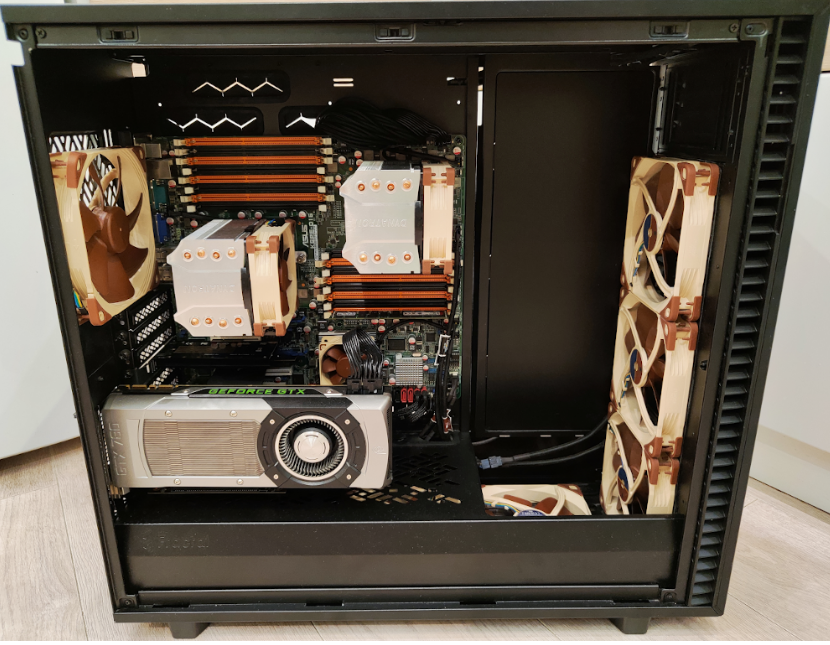
Best libre desktop computer 2024 | Coreboot, Libreboot, Gnuboot

Running kgpe-d16 on testing. Coreboot recognize only the main card to boot :expressionless: Trying Linux distro soon

EDIT: for the gpu I have found the issue

PCIe GPU Output

To use a PCIe GPU as the bootup display, PCIe Option ROMs must be executed by SeaBIOS. This is enabled in 15h.org release ROMs with the “VGA-OpROMs” tag. The relevant coreboot-15h menuconfig option for SeaBIOS is “Payload > Execute PCIe Option ROMs”. The “VGA Only” option is the recommended setting when using a PCIe GPU as the bootup display.

But I have download this rom “SeaBIOS + uCode + VGA-OpROMs”, is the pci-gpu option not already enabled?

1 Like

It is ok, you can use built-in gpu for coreboot and external gpu for the OS.

1 Like

Memtest put cpu under stress, 64° celsius after 5 minutes is too high?

My Ryzen 3200 is 64° on Idle

Now Opteron reach 75° and shutdown :frowning: The passive cooling is not possible with this machine. I have to found some decent coolers

Actually I use those “cooler”

But don’t work (and the case is open, i cannot immagine what happen with closed case), the cpu goes very hot in 5 minutes and the machine shutdown (is a security measure to avoid damage).

I also tried this combination

But don’t fit! :frowning:

64 is not high, 100 is high.

You can use the psu fan to suck air from cpu passive heat sink, just need to config a pipeline. This is what i did on my powerpc machine.

1 Like

I have fixed the coolers (were mounted in opposite side) and the rear fan (was mounted inversed :expressionless: )

I have done the first login to kgpe-d16

This is the situation now


root@debian:~# sensorsk10temp-pci-00dbAdapter: PCI adaptertemp1:        +55.2 C  (high = +70.0 C)
k10temp-pci-00cbAdapter: PCI adaptertemp1:        +68.1 C  (high = +70.0 C)
fam15h_power-pci-00d4Adapter: PCI adapterpower1:       87.55 W  (crit = 114.64 W)
acpitz-acpi-0Adapter: ACPI interfacetemp1:        +40.0 C
k10temp-pci-00d3Adapter: PCI adaptertemp1:        +57.1 C  (high = +70.0 C)(crit = +70.0 C, hyst = +67.0 C)
k10temp-pci-00c3Adapter: PCI adaptertemp1:        +69.6 C  (high = +70.0 C)(crit = +70.0 C, hyst = +67.0 C)

Great idea Only one problem: my psu fan is broken :slight_smile:

1 Like

The rear fan run at maximum speed, any way to fix? Using fancontrol?

:expressionless:

/usr/sbin/pwmconfig: There are no pwm-capable sensor modules installed

I have tried sensors-detect but nothing change

1 Like

I solved: running gnu-boot! With coreboot was a disaster (no fancontrol, no serial, no ipmi) I have added sgabios to gnuboot rom and swap the bios.

Now is finally silent

I only need a good configuration for the second fan of cpu and rear fan

Good cool (i don’t understand what is 80*!)

temp1: +80.0°C (high = +70.0°C, hyst = +65.0°C)
(crit = +85.0°C, hyst = +80.0°C) sensor = thermal diode
temp7: +34.8°C (high = +70.0°C, hyst = +65.0°C)
(crit = +85.0°C, hyst = +80.0°C) sensor = AMD AMDSI
temp8: +29.5°C (high = +70.0°C, hyst = +65.0°C)
(crit = +85.0°C, hyst = +80.0°C) sensor = AMD AMDSI
intrusion0: ALARM

I have solved also for cpu hot. 80°C were referred not to cpu1 as I think but to SR5690 chipset which can support over 100°

temp1: +87.5°C (high = +70.0°C, hyst = +65.0°C) ALARM (crit = +85.0°C, hyst = +80.0°C) sensor = thermal diode temp7: +53.2°C (high = +70.0°C, hyst = +65.0°C) (crit = +85.0°C, hyst = +80.0°C) sensor = AMD AMDSI temp8: +27.2°C (high = +70.0°C, hyst = +65.0°C) (crit = +85.0°C, hyst = +80.0°C) sensor = AMD AMDSI intrusion0: ALARM

I though temp1 were referred to cpu1, but is not true

ipmitool sensor |egrep 'CPU|SR56' CPU1 Temperature | 58.000 | degrees C | ok | 0.000 | 0.000 | 0.000 | 70.000 | 75.000 | 80.000 CPU2 Temperature | 27.000 | degrees C | ok | 0.000 | 0.000 | 0.000 | 70.000 | 75.000 | 80.000 SR5690 | 87.000 | degrees C | ok | 0.000 | 0.000 | 0.000 | 95.000 | 100.000 | 105.000 CPU_FAN1 | 1120.000 | RPM | ok | 640.000 | 720.000 | 720.000 | 18000.000 | 18960.000 | 20000.000 CPU_FAN2 | 3520.000 | RPM | ok | 640.000 | 720.000 | 720.000 | 18000.000 | 18960.000 | 20000.000

The temp1 is refered to SR5690, not to cpu1, and ipmi report is high but in range (can reach 105°!)

Actually some bugs report with gnu-boot rc6

a)reboot is not working, poweroff works!

to be clear

shutdown -r = stuck

shutdown -h = OK

b)sgabios don’t show grub :frowning:

A good new and offtopic: this controller

works fine and is supported by gnu-libre-kernel.

What OS are u using? What is the time booting after press power-0n?

1 Like

Slackware 15.0. Time boot is really fast, about 10-15 seconds after pressing power button the system start I can see the “sgabios banner” but no grub :frowning:

I have follow those instruction

1 Like

Too high temps with gnu-boot

temp1: +83.5°C (high = +70.0°C, hyst = +65.0°C)

Is the SR5690 the part cooled with the small fan in this pic?

NO..i think is not that. I made some experiments. With coreboot and no active fan the system became in the acceptable range of 60-80°C (60 idle 80 and over under heavy load)

with gnu-boot the temp1 (SR5690) became very hot even without heavy load and today I had os shutdown automatically (is a “defence” of pc when became cpu too hot to avoid damage), is a bug of gnuboot? I use rc6 (latest)

I prefer to use gnuboot because with coreboot a lot of stuff don’t work (no ipmi, no serial, and even pc leds don’t work).

1 Like

I confirm. Kgpe-d16 with gnu-boot is a great project. The bad things are:

cooling! Personally I ever use amd product since 2003 because I ever hate Intel (too expensive, too unsafe (but amd with psp is also unsafe) but I never saw a hot cpu like the Opteron. The other bad things for cooling is that is near impossible to found good coolers for g34 sockets

With the modern amd stuff is possible a passive cooling and even with 90° the pc don’t turn off

using a passive cooler with Ryzen 3200 maintain pc cooled at 40° in idle and 90° with very very high stress. The problem of modern stuff is the psp for amd and me for intel which are pratically backdoors (they have put stuff into the cpu, there is no way to escape, but seems Intel ME is possible to deactivate). And another bad thing is the proprietary firmwares needed for all (network, gpu, etc.)

Of course money solve all, let’s see this great project. Is cooled with liquid. The price is also good imho. not too high

For other.

Sata: honestly is not too bad for a daily use.

Power9: no money for test it :slight_smile:

I spended 9K on Blackbird-Power9 as i have Libre Arctic GPU and 256RAM, plus 2TB nvme, and some others fancy gpus and things. Let me tell you something, i am not interested on money, i am interested in how happy power9 makes me. = )

I do not want x86 ever again, except Librem 14 if it is fully Libre.

2 Likes

I was refer to myself :slight_smile: No money no test. If I had money I bought immediately a power9.

1 Like

Yes yes i know.

Hey your computer looks really nice and most import it is compatible on GnuBoot and GnuOS which is awesome.

Dont despair if you cant configure your gnu computer the way you want it just take some time.

Congratulations :partying_face:

1 Like

I still don’t understand why northbridge (SR5690) is becoming so hot, I have also remove VGA card from first slot and place in the last blue slot

temp1: +88.0°C (high = +70.0°C, hyst = +65.0°C) ALARM
(crit = +85.0°C, hyst = +80.0°C) sensor = thermal diode
temp7: +54.0°C (high = +70.0°C, hyst = +65.0°C)
(crit = +85.0°C, hyst = +80.0°C) sensor = AMD AMDSI
temp8: +36.2°C (high = +70.0°C, hyst = +65.0°C)
(crit = +85.0°C, hyst = +80.0°C) sensor = AMD AMDSI

intrusion0: ALARM

The cpu temperatures are ok, expecially the second, the northbridge temperature is too high considering system has not too high load

06:25:55 up 19 min, 2 users, load average: 1.89, 2.46, 1.99

Menawhile, a new term of insecurity “Intel SPS (server version of the ME)”

Other interesting news, I still don’t trust coreboot because it accept the use of blobs (which mean closed components which can hide anything, including backdoors) but is still better than proprietary bios (100% closed 100% not viable imho)

Offtopic: very nice funny error on duckduckgo searching amd epyc

1 Like