GO-Go RISC-V!!
Everything from power-on is 100% FOSS by design.
I give it a year or two before we can expect phone and full power laptop CPUs, Pine64 shows they already have a 9” tablet with a RISC-V CPU.
GO-Go RISC-V!!
Everything from power-on is 100% FOSS by design.
I give it a year or two before we can expect phone and full power laptop CPUs, Pine64 shows they already have a 9” tablet with a RISC-V CPU.
I have some risc boards (raspberry pi) they are really slow imho
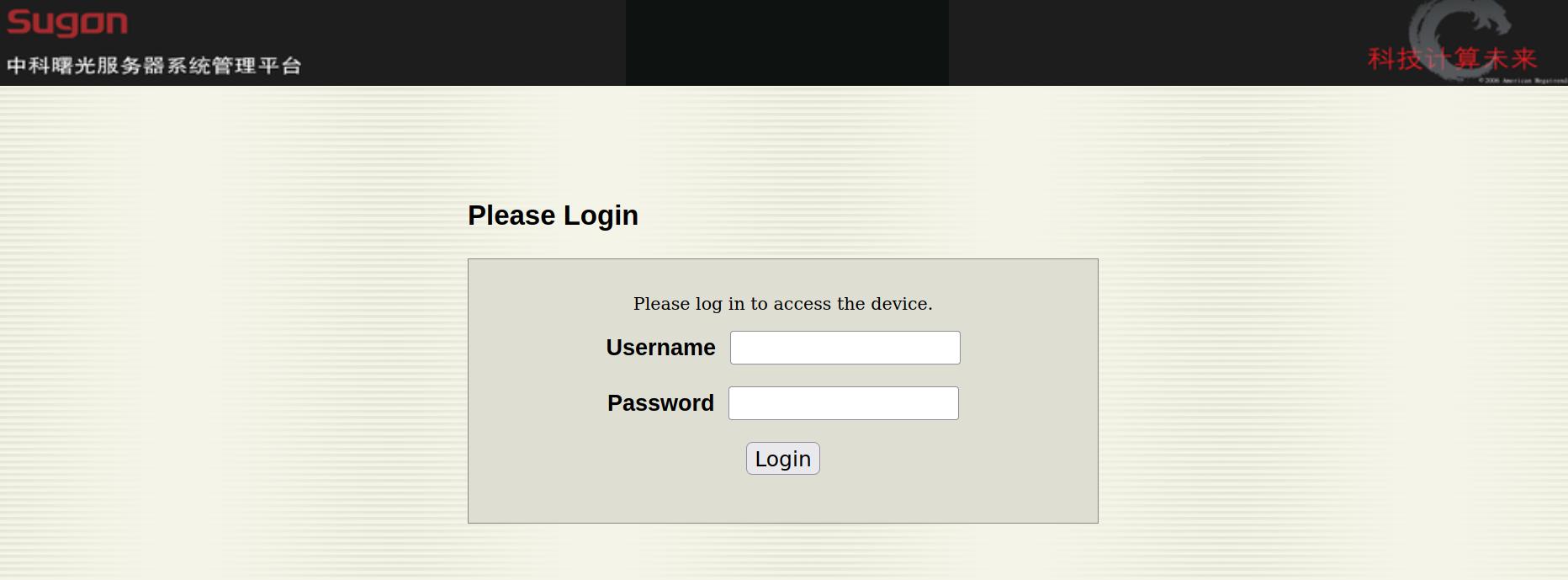
Today I open the bmc page and..what the hell is this?
Seems chinese vendor has replaced firmware.
Is openbmc?
Yes but downstream
Anyway to reset password? I use those commands
ipmitool user list 1
ipmitool user set password 2
ipmitool user set password 3
But no access, give me “Login failed. Please try again.”
You have the passswd to log-in to Sugon-OpenBMC?
No, for this reason I try to delete with ipmitool or at least recreate. I hope is possible.
p.s=the password changed works, but no http access
those are user configured
ID Name Callin Link Auth IPMI Msg Channel Priv Limit
1 false false true CALLBACK
2 root true false true CALLBACK
3 admin false false true ADMINISTRATOR
How you got connected to bmc? serial,ethernet, ipmitools? i am dizzy.
I try user admin
ssh works
http DON’T WORK
I have privileges enabled
ipmitool user list 1
ID  Name	     Callin  Link Auth	IPMI Msg   Channel Priv Limit
1                    false   false      true       CALLBACK
2   root             true    false      true       CALLBACK
3   admin            true    true       true       ADMINISTRATOR
Login as root give me (using ssh)
Discovery of Targets Failed…exiting
Initialization Of Smash Failed…Exiting
Connection to 192.168.2.1 closed.
Try to reset root password don’t work
ipmitool raw 0x32 0x82
Unable to send RAW command (channel=0x0 netfn=0x32 lun=0x0 cmd=0x82 rsp=0xc1): Invalid command
There is (currently) no way of changing the root password aside from recompiling and reflashing OpenBMC.

EDIT=not true
I can access via ssh (so password change works!) but..
Discovery of Targets Failed…exiting
Initialization Of Smash Failed…Exiting
Connection to 192.168.2.1 closed.
EDIT2: after a reset I can login!
ipmitool mc reset cold
Will be possible to update the Sugon-Openbmc to latest openbmc?
In the webpage there is the possibility to update firmware via web. But before I do this I prefer to have a new mainboard as replace in case of disaster.
I think you can not update openbmc yourself. Even raptor computer ship a old openbmc-linux5.0.
So on Raptor Computer it needed 3 gnu linux to boot: openbmc,skiroot-petitboot,os
Kgpe-d16: If something interested a good working configuration for fancontrol (4 fans, 3 defined, rear fan not defined because I don’t know which sensor use as refer)
# Configuration file generated by pwmconfig, changes will be lost
# Temp1 is the northbridge
# Temp7 is first cpu
# Temp8 is second cpu
# fan1 is the cpu fan1
# fan2 is the cpu fan2
# fan6 is the front_fan4 (used for nortbridge)
# fan8 is the rear fan

INTERVAL=10
DEVPATH=hwmon7=devices/pci0000:00/0000:00:14.0/i2c-1/1-002f
DEVNAME=hwmon7=w83795g
FCTEMPS=hwmon7/device/pwm1=hwmon7/device/temp1_input hwmon7/device/pwm2=hwmon7/device/temp7_input hwmon7/device/pwm3=hwmon7/device/temp8_input
FCFANS= hwmon7/device/pwm1=hwmon7/device/fan6_input hwmon7/device/pwm2=hwmon7/device/fan1_input hwmon7/device/pwm3=hwmon7/device/fan2_input
MINTEMP=hwmon7/device/pwm1=40 hwmon7/device/pwm2=30 hwmon7/device/pwm3=30
MAXTEMP=hwmon7/device/pwm1=80 hwmon7/device/pwm2=70 hwmon7/device/pwm3=70
MINSTART=hwmon7/device/pwm1=110 hwmon7/device/pwm2=150 hwmon7/device/pwm3=150
MINSTOP=hwmon7/device/pwm1=30 hwmon7/device/pwm2=20 hwmon7/device/pwm3=20
a little bug:
starting with fancontrol OK
starting with fancontrol, kill fancontrol, change fancontrol, restart = lot of error messages about reading from sensor
other bug: more serious
sensors don’t read the temperatures correctly so fancontrol don’t run fan at correct speed, if you use a very high cpu work (make -j32 or similar works) after one-two minutes the system became overheat and start to give errors and then kernel panic, solution? disable fancontrol (system noisy), make hard works, re-enable fancontrol
There is a specific webpage (upload new firmware) but I will try it next years, actually is working good except some little bugs, so.. 
Some bugs with gnuboot and kgpe-d16
/var/log/syslog:Mar 4 01:27:09 slackware kernel: w83795 1-002f: Failed to read from register 0x03c, err -6
/var/log/syslog:Mar 4 01:27:09 slackware kernel: w83795 1-002f: Failed to read from register 0x020, err -6
/var/log/syslog:Mar 4 01:27:11 slackware kernel: w83795 1-002f: Failed to read from register 0x215, err -6
/var/log/syslog:Mar 4 01:27:40 slackware kernel: w83795 1-002f: Failed to read from register 0x03c, err -6
/var/log/syslog:Mar 4 01:28:00 slackware kernel: w83795 1-002f: Failed to read from register 0x026, err -6
/var/log/syslog:Mar 4 01:28:05 slackware kernel: w83795 1-002f: Failed to read from register 0x046, err -5
/var/log/syslog:Mar 4 01:29:33 slackware kernel: w83795 1-002f: Failed to read from register 0x03c, err -6
List updated of hardware working or not with Libre gnu kernel
Changelog
03-04-2026: added Nvidia 710gt and GT218 to NON working cards
CPU
AMD A10-Series A10 5800K A10 5800 (don’t work with gnu-boot as I know, works with some old version of coreboot (removed in the latest versions), no know about proprietary firmware needed, no amd psp
AMD Ryzen 3 3200G (avoid all ryzen serie, they had amd psp which is the “Intel me” of Amd, is impossible to disable it, no free bios support this cpu family atm (2025))
DVB-CARDS (dvb-s, dvb-c, dvb-t)
CINERGY TC2 Stick: id 0ccd:10b2, return a lot of errors, DON’T WORK, require non-free firmware dvb-usb-it9303-01.fw
TECHNOTREND TT-connect S2-4600 aka geniatech dvb-s2 with id 0b48:3011: DON’T WORK, the card is initialized, vdr start but no channel and no motor-dish steer, in few words: dont’t work, return this error message which mean this card has the driver free but the firmware proprietary!
m88ds3103 3-0068: firmware file ‘/(DEBLOBBED)/’ not found
Capture card (usb stick, capture with decent result from vhs, old cameras, etc..)
TerraTec Electronic GmbH Terratec G1: lsusb said Bus 007 Device 003: ID 0ccd:10af TerraTec Electronic GmbH Terratec G1
ETHERNET CARDS (PCI/USB)
Suceso Ethernet-1000Mbps USB aka Realtek Semiconductor Corp. RTL8153 Gigabit Ethernet Adapter with id 0bda:8153 (works perfect, just plug and play, tested on kernel-gnu 6.14.11)
Amazon Basic Ethernet Adapter: Works perfect, no error messages at all, id: 0b95:1790 aka ASIX Electronics Corp. AX88179 Gigabit Ethernet
FS (ok is not hardware, but don’t make problems)
ZFS: a lot of users don’t like it because its license, but personally I consider it a great fs, compile fine and works with gnu-libre-kernel. The version used by Linux is open-zfs which is opensource (zfs official is a little different and has some obscure “oracleus” things)
GPU
[AMD/ATI] Caicos [Radeon HD 6450/7450/8450 / R5 230 OEM] (don’t work with gnu-libre, require a proprietary blob, the driver radeon is opensource, the firmware not, X11 don’t start)
Nvidia GP108 (138000a1) (don’t work with gnu-libre, require a proprietary blob, the driver nouveau is opensource, the firmware for this card not, X11 start but no 3d, and a lot of error messages in the log)
NVIDIA Corporation GK208B [GeForce GT 710] 10de:128b (dont’t work with gnu-libre, require a proprietary firmware if you start with 3d enabled, works only with 3d disabled (nouveau.noaccel=1) otherwise return those errors
[mer mar 4 03:05:10 2026] 0000:01:00.0: Missing Free firmware (non-Free firmware loading is disabled)
[mer mar 4 03:05:10 2026] 0000:01:00.0: Missing Free firmware (non-Free firmware loading is disabled)
[mer mar 4 03:05:10 2026] nouveau 0000:01:00.0: msvld: unable to load firmware data
[mer mar 4 03:05:10 2026] nouveau 0000:01:00.0: msvld: init failed, -19
to works with a standard kernel require this proprietary blob “nv106_fuc084”
NVIDIA GT218 (0a8280b1) [GeForce GT 710] 10de:0a65 dont’t work with gnu-libre, start with no errors, Xorg go to 100% of cpu use, after do telinit 3 and telinit 4 to return graphical mode, those messages appear
[gio mar 5 01:49:15 2026] 0000:01:00.0: Missing Free firmware (non-Free firmware loading is disabled)
[gio mar 5 01:49:15 2026] 0000:01:00.0: Missing Free firmware (non-Free firmware loading is disabled)
[gio mar 5 01:49:15 2026] nouveau 0000:01:00.0: msvld: unable to load firmware data
[gio mar 5 01:49:15 2026] nouveau 0000:01:00.0: msvld: init failed, -19
LAPTOPS
Dell Inspiron 3542/0FKWR5 (2014): no way to install gnu-boot, coreboot or other firmware, works fine with gnu-libre kernel, give only this error message, “3-1.6: Missing Free firmware (non-Free firmware loading is disabled)”, tested with version 6.17.5
IBM Thinkpad X60 (works with gnu-libre, gnu-boot) RECOMMENDED
NS5x_NS7xPU (works with dasharo firmware, not tested with other firmwares, expensive, possibility to disable Intel ME, not tested with gnu-libre)
Apple MacBook7,1/Mac-F22C89C8 (don’t work with any free firmware (gnu-boot, coreboot, libreboot) at 2025, works fine with libre-kernel except for integrated wifi, tested with version 6.17.5)
MOTHERBOARDS
Asrock B450M Pro4-F (don’t work with any free firmware (gnu-boot, coreboot, libreboot) at 2025, amd psp
Asrock HDV R4.0 (don’t work with any free firmware (gnu-boot, coreboot, libreboot) at 2025, amd psp
ASUS PRO B550M-C/CSM (don’t work with any free firmware (gnu-boot, coreboot, libreboot) at 2025
ASUS A88XM-E (works with Coreboot 4.18, support removed since 4.19, no amd psp)
ASUS F2A85-M (works with Coreboot 4.18, support removed since 4.19, no amd psp)
ASUS F2A85-M PRO (works with Coreboot 4.18, support removed since 4.19, no amd psp)
Asus kgpe-d16 (works fine but with some bugs: the fancontrol is a little problematic, no videooutput and for grub on serial the bios need to be patched for use sgabios instead of seabios)
WORKSTATIONS/PC/SERVERS
HP Microserver NL40: Works all, except those devices (one is the Radeon VGA RS880M [Mobility Radeon HD 4225/4250], the cpu is very old and a little slow but is bug-free (no know hardware bugs like spectre and similar not-fixed), NO free bios available for this machine.
[ 3.396531] 2-3:1.0: Missing Free firmware (non-Free firmware loading is disabled)[ 21.940399] 0000:01:05.0: Missing Free firmware (non-Free firmware loading is disabled)[ 21.989491] 0000:01:05.0: Missing Free firmware (non-Free firmware loading is disabled)
IBM 9111-285 (works with gnu-libre, NO gnu-boot or other free bios, very outdated, slow but usable, cpu with serious hw bugs still not fixed, kernel 6.* is not recommended because can hang on boot), a notice: is very old hw, it belong to another era in which states don’t use amd psp, intel me and other shit to track users, so I think even without a libre firmware is more safe than more modern hardware with coreboot (and proprietary firmware loaded), PROBABLY!
Update: using coreboot-rom without blobs works all leds and ipmi. But instead of this you have to take this (at least for my kgpe-d16 works).
Update-2: i’m testing the board under medium load (some vm opened) and temperatures go fast towards 60-65°. After that programs start to disappear and appear kernel panics and other serious errors. This is probably because cooling is not properly done. Using those two
even with fans (active cooling) seems not sufficient. I will try soon other solutions.
To avoid overheating I also increase values for fancontrol
today new kgpe-d16 arrive..miracle: no asbm module this time! I will test more intensive it later, yesterday I have tested the one with asbm module and I get overheating
Actually (but is idle) seems a little good than the other one
temp1: +47.5°C (high = +70.0°C, hyst = +65.0°C)
(crit = +85.0°C, hyst = +80.0°C) sensor = thermal diode
temp7: +40.5°C (high = +70.0°C, hyst = +65.0°C)
(crit = +85.0°C, hyst = +80.0°C) sensor = AMD AMDSI
temp8: +37.2°C (high = +70.0°C, hyst = +65.0°C)
(crit = +85.0°C, hyst = +80.0°C) sensor = AMD AMDSI
EDIT: I found another bug, I have tried a compile a program using all cpu cores (make -j32)
and..
the temperatures reimains “fixed”, like module don’t update, what can it be? This is very dangerous because fancontrol can be “fooled” and don’t accellerate the fans even when (real) cpu temp increase.
Meanwhile the module k10temp report correct temperature and update it
EDIT2: no bug, only fancontrol misconfigured, a working configuration is this
INTERVAL=10
FCTEMPS=/sys/devices/pci0000:00/0000:00:14.0/i2c-1/1-002f/pwm1=/sys/devices/pci0000:00/0000:00:14.0/i2c-1/1-002f/temp7_input
FCFANS=/sys/devices/pci0000:00/0000:00:14.0/i2c-1/1-002f/pwm1=/sys/devices/pci0000:00/0000:00:14.0/i2c-1/1-002f/fan2_input+/sys/devices/pci0000:00/0000:00:14.0/i2c-1/1-002f/fan1_input
MINTEMP=/sys/devices/pci0000:00/0000:00:14.0/i2c-1/1-002f/pwm1=32
MAXTEMP=/sys/devices/pci0000:00/0000:00:14.0/i2c-1/1-002f/pwm1=58
MINSTART=/sys/devices/pci0000:00/0000:00:14.0/i2c-1/1-002f/pwm1=150
MINSTOP=/sys/devices/pci0000:00/0000:00:14.0/i2c-1/1-002f/pwm1=30
Anyway I’ve decide to replace case and use liquid coolers, those cpu’s became very hot expecially if case is not too large (mine is a classical server case, not too large)
idle: 40° OK
under-stress: over 70° NOT OK
the fans made my room really warm  better try a liquid cooler, something like this one, the problems is to find the parts (a user is selling this workstation on ebay, unfortunately i have no money to spent atm, otherwise I would buy it)
Actually I plan to rebuild using liquid cooler and a very large case. In your opinion a case like the Frtactal Design define 7zl can allow two Zalman LQ310?
Still not Libre NVK Vulkan 1.4 on Mesa26 on Nvidia Maxwell 1.0