I do not have a KGPE-D16, or even a computer compatible with GNU Boot. But if I did, I would report the issues to them. There are mailing lists for bug reports and for general discussion and an IRC room.
Did you have the irc address please?
It is #gnuboot on libera.chat.
Tried the latest coreboot 15th rom
The good stuff:
Reboot works (with gnu-boot hangs)
No more hangs on startup
Serial output works
The bad things:
Error initalizing Radeon gpu 
Error with fancontrol
Those thing works fine with gnuboot.
The error for fancontrol
root@hody:~# modprobe w83627ehf
modprobe: ERROR: could not insert ‘w83627ehf’: No such device
Finally I understand why gt710 needs proprietary firmware and is: not all gt710 are identical. Some of them: the more recent require proprietary firmware, the old works probably (still not tested) with free firmware. How I discover this? Some days ago I tried to pass the gt710, this one to Windows XP for a good retrograming. The card is recognized, the driver install and on reboot..don’t work nothing
I search on google the pci ids of card and they confirm the card is not compatble with XP, too modern, meanwhile old gt710 can works, same thing can be for firmware.
So next time instead of said “Gt710 works with gnu libre” is better to report the exact model using this command
lspci -nn|grep VGA
So, what is the output on yours?
The -nn flag should show also the vendor and product identification numbers. However, because your model is GK208B [GeForce GT 710] (rev a1), its product ID must be 128b as reported on h-node. It is a GT 710 with a GK208B core, which is of Kepler family. The core is old, so its behaviour must be old too.
What exactly fails without the firmware? Did the vendor add something into the new card that requires a new firmware? They could overclock or otherwise fine-tune the GPU, or add a heatsink, or change memory modules, but that all is unlikely to require a new firmware. The GPU core cannot be the reason because it is an old Kepler core which is known not to fail merely due to absence of the firmware.
Did you try it at lower resolutions and with different cables? What does glxinfo say? glmark2?
“What exactly fails without the firmware?”
No 3d.
Atm I’m in another city, I will return in main city next days I will report the id
Here we are
05:00.0 VGA compatible controller [0300]: NVIDIA Corporation GK208B [GeForce GT 710] [10de:128b] (rev a1)
This graphic card with those id require proprietary firmware to enable 3d.
Meanwhile some “good” news. With my “personal notes”.
https://www.phoronix.com/review/amd-opensil-coreboot-ar1/2
The good news
- some users report is possible to disable PSP (not with this board, with another board more expensive an “professional”), I have found the article..but I lost
 I will report if I found it. If is true, and the disable is real (must be tested by experts) is a great news
 - is opensource
The bad news
- the binary policy of coreboot allow blobs so is not completely open as the good old configuration with Opteron
- if PSP disabling is not possible is useless, is like the “hey! I have a free blob OS and kernel” “yes, but with a backdoor in the cpu”
 )
)
Final notice: Raptor is still the best, Opteron is ok for poor people like me, but this new dasharo bios even is not 100% open is a great new imho.
EDIT: I have found the “psp boot”
source: Thoughts dereferenced from the scratchpad noise. | Gigabyte MZ33-AR1 Dasharo v0.9.0 Released
Fast Boot does not reduce boot time. The Dasharo setup menu option to enable Fast Boot has no measurable effect on total firmware boot time in this release. The feature flag is present in the menu but the underlying optimization path does not improve the boot time in a significant way. Still, Dasharo firmware boots much faster than vendor firmware:
-
Dasharo: < 15 seconds (without PSP), or < 55 seconds (with PSP) -
vendor BIOS: over 2 minutes (without PSP), or over 3 minutes (with PSP)
Thank you for sharing that. The h-node page for a GT 710 says 10de:128b too. Maybe, it is not enough to distinguish between the cards? May I ask you to share the “Subsystem” ID of the card? Is it 1462:8c93 like in the linked report or something else? You will see it when you run sudo lspci -nnk. Does it also show nouveau being used?
Could you also tell which distribution you are using and which version? Also, what kernel does uname -r show?
So, I would like to clarify:
- Subsystem ID
- GNU distribution
- libre kernel version
- driver is nouveau
Hi, actually I use a standard kernel, because I don’t have a compatible gpu for gnu kernel. I had the rest
Kernel used: Gnu-kernel 6.16.12-gnu
Gnu distribution: Slackware 15.0
driver nouveau: standard Slackware package
Subsystem ID:
05:00.0 VGA compatible controller [0300]: NVIDIA Corporation GK208B [GeForce GT 710] [10de:128b] (rev a1)
Subsystem: NVIDIA Corporation GK208B [GeForce GT 710] [10de:118b]
Kernel driver in use: nouveau
Kernel modules: nouveau
Doesn’t Trisquel live USB boot at all? If Trisquel boots, what does glxinfo | grep Device say? Is it llvmpipe (software rendering) or something else?
I had to test it, and actually I put the board “in production” and I cannot test it, maybe in the future yes.
Meanwhile another good news: with the coreboot rom for kgpe-d16 misteriously the grub-menu appear!
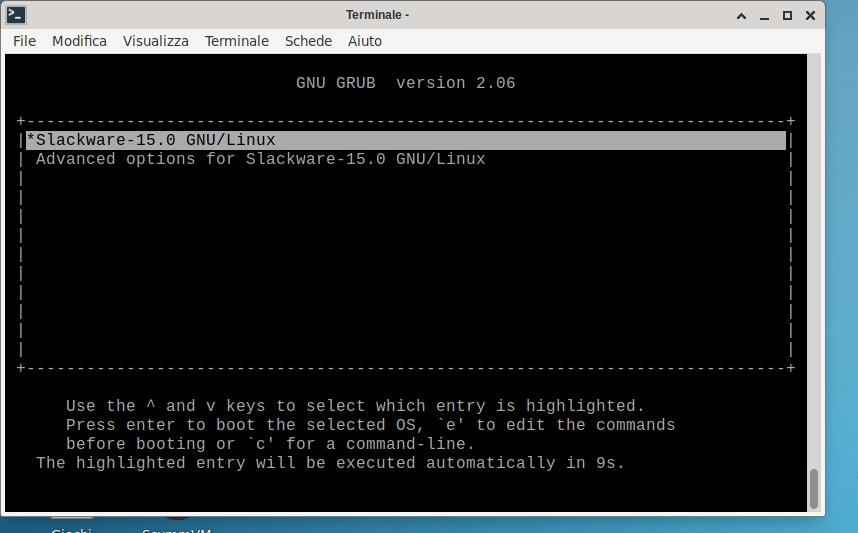
I use this configuration
slot pci-e 1: empty
slot pci-e 2: ati radeon primary display
slot pci-e3: usb-3 controller via
slot pci-e4: very old Gs7200 nvidia card (trying to pass it for retrogaming)/also Matrox M91XX is ok
slot pci-e5: usb-2 controller
slot pci: empty
With the slot pcie-4 occupied by new (now removed because totally useless: don’t work with XP, require proprietary firmware and make video problems with Linux) nvidia gt710 the grub menu don’t appear. I don’t know if depend from video card or from slot pci-e5 occupied (the Gt710 with big passive cooler occupy 2 slots)
New update: today transferring via usb one disk to another..the pc shutdown immediately! The cpus were not warm, were about 35°, so I think my power supply is defective, the confirm arrive after changing a board with a different one (Faa85-m pro) and refuse to start, so the power supply is gone Lucky I can try with another one, if the “uninvited shutdown” re-appear I will update
Forgot the previous “bugs” of shutdown of roms, my power supply failed, not the roms
Confirmed. Was my psu failed. Meanwhile two news:
- I have ordered a more recent liquid cooler, because the zalman lq-315 is became really stincky and I feel a bad smell in air
- I have asked to google ai some opinions about the new ryzen coreboot firmware and it confirm amd psp remain active and strictly closed source, so there is no alternative atm: or amd opteron, or old amd fm2 with coreboot (some firmware closed, but at least no psp) or expensive Thalos workstation
Yeah i was surprised that opensil is not libre, however opensource evils claims opensil opensource. Then i could call opensource to a fully propietary software.
AMD GPU is superterrible on BLOBs too making even worse to bootloader.
Personally I’m not surprised, the governments use internet to control mass or avoid “rebels” so a free and hard to penetrate/remote control machine will become a mirage in future (and also now).
A lot of people think when a part is opensource all system/os/program is opensource, this is false and can create a false sensation of security.
Another option that appeared recently (2026): MNT Station
MNT Station is a quiet and space-saving, future-proof open hardware computer for your desktop, homelab, or mounted on a wall as an edge device/router. It’s also a robust enclosure for your existing MNT Reform mainboard and can be turned into a standalone desktop PC, silent home NAS, or low-power entertainment center.
As usual, this MNT Research device is fully open source hardware with all sources publicly available. As a modular, general-purpose computing platform, MNT Station is the most flexible MNT device yet designed!