I just upgraded my signal flatpak on my Librem 5 from 7.71.0 to 7.72.1 and the graphics look horrible. The icon images on the left panel are corrupted, and all the text is blurry.
I tried manually downgrading to 7.71.0 by downloading the signal_arm64.flatpak file from Releases · signalflatpak/signal · GitHub, but when I tried running it I got an error message saying my database is incompatible with the older signal version.
Any suggestions on how to resolve the graphics problems?
I saw in your other post about the Pure Maps that Signal reverted back to being an X11 application. You can try this trick to enable it to use Wayland: What happened with flare - #9 by mel
Yes, I added the Exec=flatpak run org.signal.Signal --use-gl=egl --enable-features=UseOzonePlatform --ozone-platform=wayland line to my .desktop file a while ago, and it worked fine until the latest 7.72.1 signal update. After the last update, signal seems to have reverted to X11, despite the arguments in the Exec line.
However, I just tried running the following command from the terminal, and that seems to make signal work with wayland:
flatpak run org.signal.Signal --use-gl=egl --enable-features=UseOzonePlatform --ozone-platform=wayland
The command is the same as that in the Exec line in the .desktop file, yet for some reason, it works from terminal but not from the .desktop launcher. Any idea why?
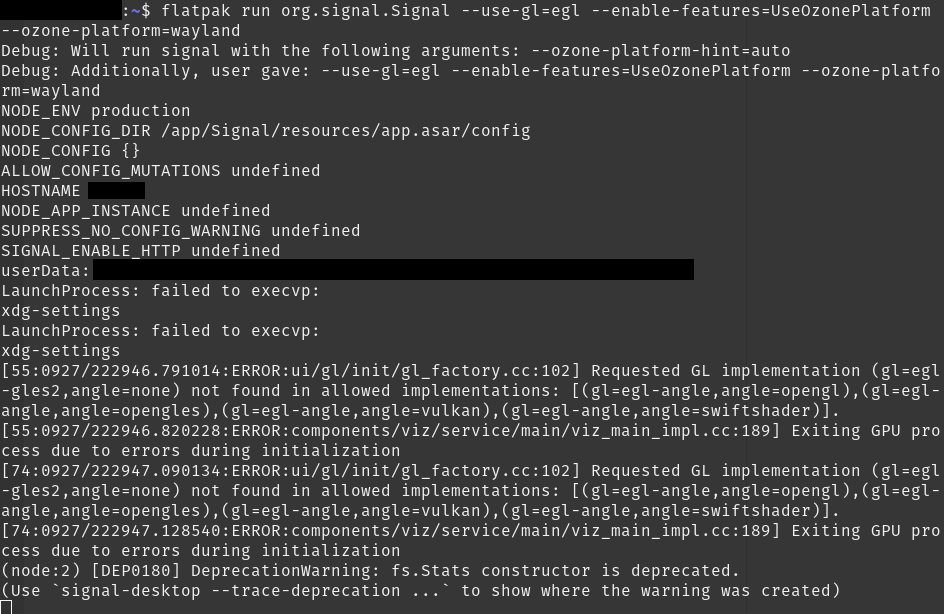
I get the following output from the terminal command. There seems to be some error regarding the –use-gl=egl argument, but signal still starts and runs using wayland when launched from the terminal.
That’s weird. I do not get the same blurriness or corrupted images on the same version. I do get the same error running in the terminal, but like you said it still loads into wayland. Maybe something went wrong during the upgrade? Have you tried flatpak repair org.signal.Signal
It seems like what @skalman linked to is that it is a wider problem, with the wayland flag recommended as a fix. If the .desktop file is not working at ~/.local/share/applications one other thing I used to do was tweak the .desktop file from the flatpak directly. Assuming you installed the flatpak at the system level, it is located at /var/lib/flatpak/app/org.signal.Signal/current/active/export/share/applications
Can you explain a bit more what you mean here? Do you mean that the fix would be to edit the .desktop file there?
In the .desktop file there is a line like “flatpak run org.signal.Signal” or similar and then the fix is that some extra options are added on that line?
Adding that line to the .desktop file in /var/lib/flatpak/app/org.signal.Signal/current/active/export/share/applications made no difference. It still launched using X11 when I clicked the launcher icon.
Yes, I think it’s the same problem. I can do the workaround by running flatpak run org.signal.Signal --use-gl=egl --enable-features=UseOzonePlatform --ozone-platform=wayland from the terminal. That command successfully launches signal with wayland. However, the same command does not work when I add it to the .desktop launcher, so I can only use signal by launching it from the terminal.
Hmm. Did you try deleting the .desktop file in the ~/.local/share/applications after you modified the other one? Supposedly the user level file has priority over the system one.
But still, it should be working already so I am not sure what the issue could be.
I tried running signal by tapping the launcher icon, and it still opens in X11. However, when I run ./launch_signal.sh from the terminal, it opens with wayland.
I just tried rebooting, and that solved the problem.
I also just tried setting the Exec line back to flatpak run org.signal.Signal --use-gl=egl --enable-features=UseOzonePlatform --ozone-platform=wayland and rebooting again. Signal runs with wayland from the launcher icon now.
Do you follow the US Government leaks surrounding the Immaculate Constellation / Legacy Program topics? One of the recent leaks included a guy claiming that FBI has compromised Signal and has backdoor access.
I believe the journalist Ross Coulthart who was following the topic said the same thing at one point.
This whole topic to me is an example of how Signal Messenger makes it difficult to use a Librem 5 with their service, because their work with the government requires a device where the “user” is not root in order to compromise the communications with Client-Side-Scanning.
[NOTE: Signal and the FBI will tell you that I am promoting a conspiracy theory by posting this, so if you would like, it’s OK to laugh off what I am saying as baseless.]
[NOTE 2: I do not have an alternative encrypted communication technology to endorse. I do not use well-encrypted communications. All my stuff is compromised totally.]
No, I hadn’t heard about that, but client-side-scanning is something I do worry about with Signal on non-free devices. I’d be interested to learn more. Do you have any links to more information I can read about these claims?