Hi, I recently did a PureOS software update. Afterwards, my computer doesn’t load up. It just gets to a blank black screen with a small blinking cursor up in the top left of the screen.
Looking for any help or suggestions. Thankyou
Hi, I recently did a PureOS software update. Afterwards, my computer doesn’t load up. It just gets to a blank black screen with a small blinking cursor up in the top left of the screen.
Looking for any help or suggestions. Thankyou
I have no idea what could have happened (except that a desktop manager is not loaded), but try pressing Ctrl-Alt-F1, Ctrl-Alt-F2, …, Ctrl-Alt-F7. One of these combinations should drop you into a Linux terminal login screen from where you could try to troubleshoot further.
What is the computer? Librem 14? Other laptop / desktop? Librem 5? Something else?
In any case, in addition to the suggestion in the previous post, can you SSH in? Is the computer on the local network?
Otherwise also try LiveBoot if this is not the Librem 5.
With any of those three approaches you may be able to examine the system log to find out what went wrong.
This generic problem has been around in Linux for a very long time in a wide variety of environments and distros. Typically it means that the GUI didn’t start, which can be because there is no available graphics device (discrete or integrated) because of driver problems or maybe there is some configuration problem in the GUI or …
I assume that this problem is 100% reproducible and not just some one-off cosmic ray event. That is to say, I assume you tried the IT Panacea of turning it off and turning it back on again. (If you haven’t done this then I would hold off doing this and first attempt to troubleshoot the problem.)
thankyou, I tried all those combinations and wasn’t able to get a terminal.
thankyou.
Librem 14 desktop. I’m not aware i f I can ssh in. I’m familiar a little with ssh, I have a windows computer I can use - but not sure how would ssh into it.
I can try Liveboot - I’m not familiar - could you send me a link to learn more. Would this delete the files and apps I have on the device?
I tried the Ctrl+Alt+F1…F7 as suggested by Vuntun but noting happened. So I don’t know of a way to access the terminal and possibly look at logs.
I have tried turning off and on again. Also I have no peripherals attached.
Link to the video I made showing what’s happening:
For starters just try ping a.b.c.d where a.b.c.d is the IP address that the Librem 14 has. The ping command should be valid from any Linux computer or any Windows computer.
A question of course would be … how do I know the IP address? That depends on how you have set your network up. If you have done nothing explicit or complicated, jump on your router and see the IP addresses that have been handed out to the various devices on your local network.
No. Liveboot just means to boot from a USB flash drive that you have previously prepared or procured for that purpose. It boots into a stable, clean, GUI environment.
Something like: Installation media - Purism user documentation
But make sure, in all that, that after you choose “Test or Install PureOS”, you don’t actually go ahead and install PureOS using the Calamares installer.
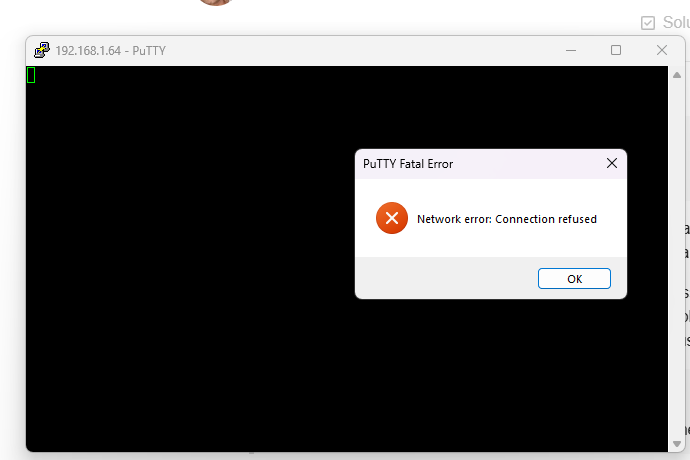
Ok I was able to get the IP address from the router. And I can ping that IP. But can’t access it through ssh
OK. That gives you an indication that the boot has progressed at least to the point that the network has been brought up, which helps to pinpoint where things are going wrong (and tends to confirm that the problem is no worse than a GUI problem).
Unfortunately …
I guess that means that you didn’t install and enable the SSH server.
(For sure this a trade-off. By having the SSH server permanently enabled, you are increasing the attack surface and potentially doing so for the purposes of something that you will rarely use. But the other side of the consideration is fairly obvious.)
So I guess LiveBoot it is for you. LiveBoot gives you the potential for various activities:
An alternative potential approach is to restore from a recent disk image backup, assuming that you do such backups. Do you?
Unfortunately I don’t have a disk image backup. I do have a USB stick that came with the computer that says Librem on it. (I bought the computer used from a friend). I’m not sure how to check what’s on the USB - if I put it on a Windows computer it says it wont recognize the file system it and asks to format it so I chose no. I’m not able to find any instructions on how to boot from this USB ?
I inserted the USB then rebooted and hit the Esc button during boot up to access the boot menu. Here are the options:
The link I gave above actually covers booting from USB as well as preparing it.
Without knowing what’s on the USB stick that you are talking about, I am uncertain whether it is bootable at all, what behaviour to expect etc.
I recommend using the link I gave above to create a USB stick that is a known quantity. I am assuming that you have a spare USB stick around or can readily obtain one.
I don’t recommend overwriting the one you are talking about since you don’t know what’s on it. If you had any other Linux computer e.g. a Raspberry Pi, you could investigate what’s on the unknown USB stick.
Perhaps you could ask your friend what’s on the USB stick that you are talking about?!?
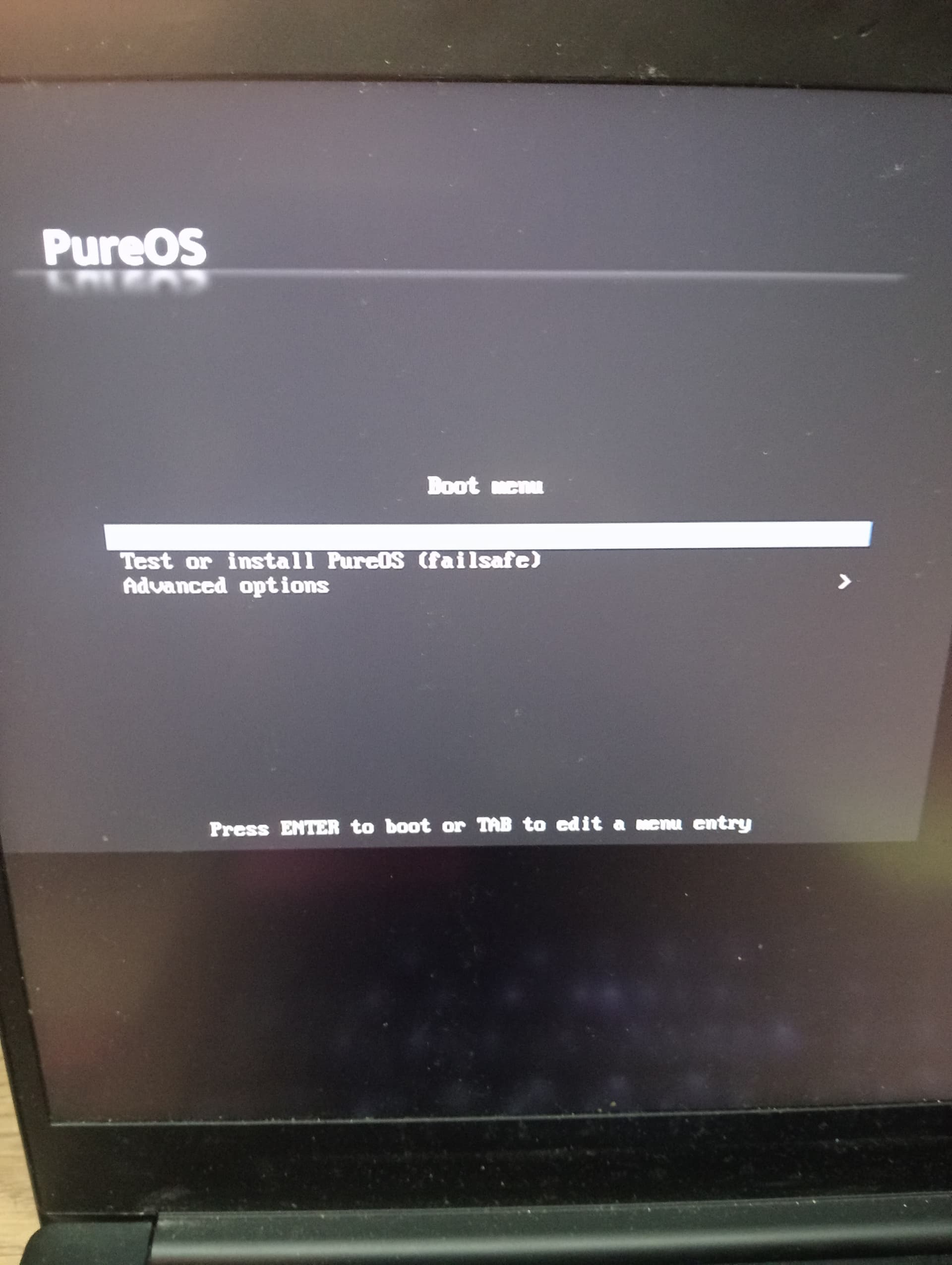
thankyou. I created the boot disk - rebooted and when into boot menu to choose boot from USB. I am now at this screen:
I think something’s not right. That doesn’t match the expectations from the link I gave you above.
At this point I would suggest fault isolation by verifying that the LiveBoot USB is actually usable on another computer but I am not sure that you have a suitable computer. (I mean you can have a go on your Windows computer but failure to boot would not be definitive.)
An option may be to buy a suitable LiveBoot USB from Purism.
You haven’t gone into any detail on your procedure for creating the LiveBoot USB and I have no Windows computer at all so I can’t say what the correct procedure is on Windows and what the traps, tricks and pitfalls are when using Windows.
Another option may be to seek help from Purism Support.
I downloaded the .iso file from Download PureOS . I used Rufus to create the bootable USB drive as shown in the video https://www.youtube.com/watch?v=kwDSIOqt6xI .
OK, so can you boot the Windows computer from that USB drive?
OK, I will try booting the Windows computer from the USB drive. I’m a little hesitant tho - I dont want to mess up Windows its the only computer I have left. So I will make sure to back everythign before trying that.
On the Librem14 - not sure if it means anything but I did get the PureOS Boot Menu when booting from the USB drive. When I choose “Test or Install PureOS”, it drops into the Busybox shell. If I choose the failsafe option it boots into a blank screen.
OK, I didn’t realise that from your earlier post. That puts a different complexion on things and should vary the troubleshooting approach. Probably don’t bother to boot the USB on your Windows computer. 1 At this stage I would say that you actually need to use Busybox to work out what has gone wrong. However I don’t think I can guide you with that. Maybe time to involve Purism Support?
1 Really this should be quite harmless if it boots at all.
thankyou. I’ve reached out to Purism support. I’ll share any findings here.