maybe its user error but so many bugs or issues with phone.
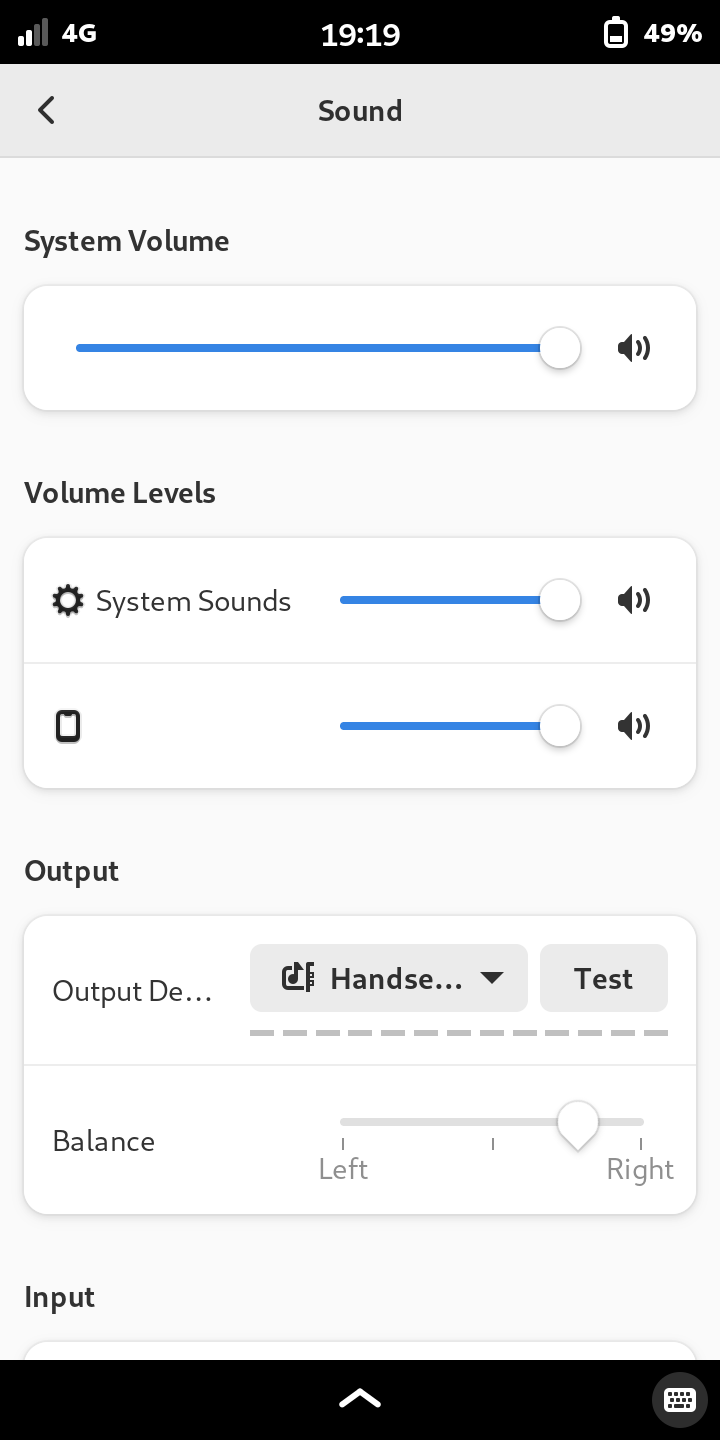
yesterday or recently calling worked. today i played a youtube video earlier and sound worked. but tried calling someone and no sound a bit ago. youtube was being slow so couldnt test that, but no sound plays on any vidoes ive taken. when i put volume button up or down it makes the noise associated with it. system sound was off in menu i noticed but turned it all thr way up and no change. system volume was all the way up. when testing the speaker out put that works and i can hear it say right speaker and left speaker. whats going on? i toggled the microphone kill switch on and off turned phone off and on.
i put the headphones in and same problem. i can hear the volume up switch make that response noise. but no phone calls. is it a software thing? i just checked for updates and did them nothing changed. or some setting i accidently hit?
Sanity check: If you have the microphone kill switch in the “off” position while taking a video then there should be no sound in the video that you have taken. So to test whether that is the case, I would copy the video to another computer and play the video there in order to confirm that the video does actually have sound.
Just for the record that not all hks work faster which will make ghost things. Newer L5 it has fancy faster capacitor for charger, discharger which reduce the ghosting, so newer L5 the HKS work faster than older. So anyway please leave a lapse of time to help android-phosh to update.
So there might be a system wide thing going on with the phone. So i recorded a video and emailed it to myself, there is sound on the computer not the phone. I tried to check anyway the phone makes noise. Ive set an alarm and it only vibrates (I’ve never set an alarm before so Idk what its supposed to sound like). When trying to play back the videos in the Uplayer, they won’t even play, or they may play for a second and freeze. which it used to not do. When I play them with VLC player they do play but no sound. when I record a memo with “sound recorder” and I play it back in the app it will play for a second and then freeze, like Uplayer does. Memos I’ve saved outside of the app open in VLC player but don’t play sound. I use a VPN for youtube it wasn’t working on the land. I have better service in town still not working, I finally turned it off and still not working. The video will just load for ever and maybe play a second of the video. But yesterday morning I played a video with the vpn and it played just fine.
So like playing any media causes it to freeze, except VLC player which has no sound but will play it. But the speakers do work, when hitting the volume up button or testing the speakers in settings they respond with sound. but also theres no sound on calls. I forgot to ask if the other person can hear me, but the mic works as the video I emailed to myself had sound on it when playing it on computer.
I have a text conversation I would like to save, is there a way to export that? Also some photos and videos. Do I have to use the jump drive thing to transfer to my laptop then onto a thumb drive?
Install ssh and use filezilla or whatever to move any and perhaps all files. I often just image my /home and keep that snapshot, maybe get apt to | to a file listing what you have installed. I guess look for what you have compiled from a git or whatever too.
I think this will work for you(run on phone)
I have that in my notes form a while ago when I was always reinstalling on my pinephone on mobian.
(edit)
Of course reinstalling everything could lead youback to the dead end you are experiencing, but it is nice to have the option of getting everything I guess.
I often do this but it is easier for me to have a text file list of major programs and maybe stuff installed under python(which you can grep out of the file above)
Contacts database is stored here: /home/purism/.local/share/evolution/addressbook/system/contacts.db
Calendar here: /home/purism/.local/share/evolution/calendar/system/calendar.ics
and: /home/purism/.local/share/evolution/tasks/system/tasks.ics
Memos would be in this folder: /home/purism/.local/share/evolution/memos/
And obviously, if you have any saved items on the drive, move them to external storage if you don’t want to lose them.
I tried it the way on the link and it looked like it just made a text document of who called and what time, not the actual text conversations (but I didnt look at the whole document it was long). Ill try some of the other ways later. Really I only want one conversation, i only have one person saved to my address book and thats the one I want but Ill see.
So I can just go to the chat history folder and then export that folder to like email? I haven’t set up a way to get things off phone with USB, like jump drive. Is there an easier way to just plug in phone and pull folders off of it, and also photos or do I have to use jump drive?
(edited and extended for clarity) That should have everything, just saving chat.db is what I have been using if I have my notes since perhaps even the Maemo5 N900 to get my chat history though shortcutting and saving everything past purple works too for lazyness and gets other IMs too being that libpurple is pidgin’s(GAIM for old folks) catchall for various IM conversations especially when there were so many 20 years ago ie:google, AIM, Yahoo, ICQ, etc). ThirdPartyPlugins – Pidgin
Not sure exactly what you mean, but saving /home/purism/.purple/chatty/db/chatty-history.db somewhere else to copy back later definitely restores the chat history. I just tested it (again), with a couple of restarts thrown in (although I didn’t actually reflash my phone in the process).
Saving the images from the MMS file will allow restoring the images, as well, when they’re copied back: /home/purism/.local/share/chatty/mms
If you copy it to an email, it could expose your conversation on some server somewhere, but yes, that would preserve it. Or simply copy the file to a microSD card in the phone, if you have a microSD card. Or use a USB drive.
To expose the L5 file system by cable to computer, yes, you currently need to use the jumpdrive scripts. But you could set up ssh/sftp, and then you could view the L5’s entire file system on your computer without any physical connection, over your wifi network.
It may be that you have to enable “Show hidden files” in the menu within the Files application. (The “.” before a folder or file name in Linux means the item is normally hidden from view.)
Oh i have a micoSD card in a flip phone I can put in the librem 5 didn’t think of that. Is there a worry of breaking the microSD card in the librem 5 like I did with the sim card. It has alot of valuable things on it.
Okay so how do I get to the .purple folder. Im trying to find the path /home/purism/.purple/chatty/db/chatty-history.db to copy it over. I see home/purism but then don't know where .purple is to continue to chatty/db etc.
okay thanks! I found it. I think ill try the jump driveI haven’t backed up the microSD card and I don’t want to break it. And I wanted to be able to usb things to computer anyway. Ill try that tonight thanks!
By the way, you probably want to set your APN in the mobile network settings again, and the SMS/MMS settings in Chatty before copying the .db back in after flashing. Also your one contact in the Contacts app. (Just to make sure everything sorts and attributes correctly. I’m only guessing, though.)