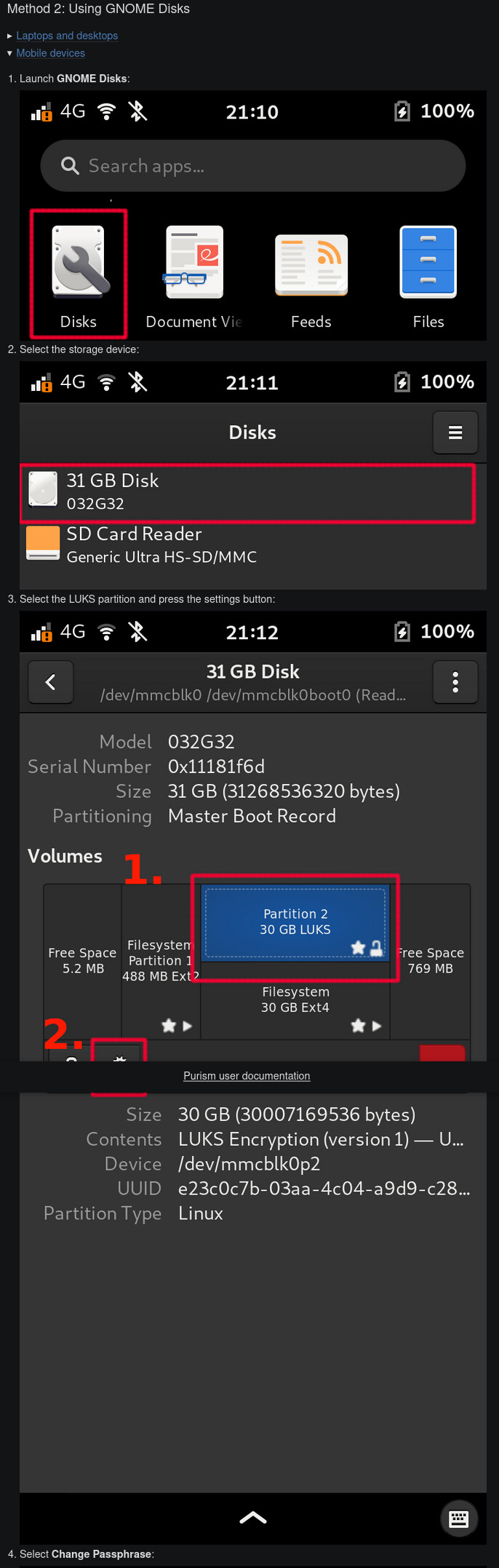
Anyone able to change luks disk encryption password from gnome disks? I did a clean flash of crimson alpha, but disk password remain unchanged after modifying it with Disks.
I flashed Crimson alpha just now and was able to change my LUKS disk password with Disks. I didn’t update the system or install any software after flashing.
I tried changing password immediately after flashing and then also after upgrading to unofficial backports and installing unl0cker. The password is still the default.
I’ve had no problems changing it after the latest flash with Disks.
I also could change the LUKS password. But I did not a message like: “job: changing passphrase”, could it that you accidentally interrupted this process?
Did you try it? 
sudo cryptsetup luksChangeKey /dev/sdXn -S 0
If I remember well it doesn’t work using Disk app due to a bug. Moreover please remember that you’ve to use only numbers, thank you
I followed the steps in their documentation for GNOME Disks.
A LUKS slot unlock passphrase is not restricted to only numbers.
In fact, my recommendation would be to use characters from all 4 of the typical ASCII character subsets.
(If you use only numbers then in practical terms your disk encryption will too easily be able to be brute-forced. However, how serious that is depends on your threat model. For low-end threats e.g. loss or casual theft, better to have a weak numbers-only passphrase than not use LUKS at all.)
I was trying the wrong option. I was earlier trying “Change encryption settings” and setting a password there. It worked when using “Change password” option. Somehow I missed that first time.
Just got Crimson on my L5E yesterday, booting from µSD. My initial thoughts are that even with the long load times because it’s not on the eMMC, everything seems smoother. It might just be confirmation bias, you know, like your car seeming quieter and smoother after a good detail job, but I like it. Totally worth the time invested.
It wasn’t all that hard to install apps, configure, etc. Amazingly, Firefox is easy to read out of the box – if I can figure out how to move the controls to the bottom, I don’t think I’ll even need the Firefox Mobile Config scripts. Bring on Dawn!
I will still try Mobian on the µSD, for kicks, but it will have to be better for me to switch.
There is an old thread called “It’s a burning phone” that I used to laugh at, but right now I’m transferring 40GB of music to the phone over WiFi/SSH… and it is HOT (over 50C). Took a call, you know, one of those that goes on forever? Yeah, I had to keep switching hands. I’m not laughing any more!
Here is the GitLab repository if you need to use it:
firefox-esr-mobile-config is available in crimson, a newer version can be installed by adding debian’s bookworm-backports repo (crimson ~= bookworm+some changed packages).
Both crimson and byzantium already have the latest version of firefox-esr-mobile-config (4.6.0 + aae92d26, making it equivalent to 4.6.1). It’s not just available, but even installed by default - and has been for years now.
Pre-installed, or in the repo?
Was pre-installed on Crimson when I tried hacky early Crimson about a year ago, then also installed itself on Byzantium maybe about 6 months ago seemingly automatically (until then I had not bothered to install it).
But along with mobile firefox config stuff automatically pulling in on a Byzantium update, it also set the Firefox default search back to Google at that time on my L5 from what I recall. Seems scummy that a company advertizing “the power of defaults” would change me back to Google, but I wrote it off as a consequence of focus moving to Crimson and I respect that.
I do not respect scummy practices.
I must have gotten my L5 long-enough ago that I had to do that stuff manually.
I can believe it is installed on Crimson by default, because it is such a nice experience… except – how do I get the controls and address bar to go to the bottom?
In about:config, add an mcf.addressbarontop entry with a boolean value of false.