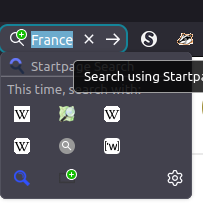
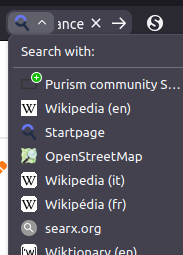
The first annoyance I’ve noticed in Firefox 149… well, in LibreWolf 149, as LW received the update before my Firefox installation:
Degraded usability of the search box widget (for those who use it).
In previous versions, through 148, typing a search term in the widget automatically opens a drop-down box allowing you to easily click a particular search engine you might have added - Wikipedia, Open Street Map, Searx, etc. - which are displayed in a compact tiled arrangement. Click the one you want, or right-click and choose “Open in new tab.”
In 149, typing a search term in the widget does… nothing… unless you then also click the search icon, and instead of showing the compact tiled arrangement of your added search engines, it displays a vertical list, forcing you to scroll down through them with the mouse pointer (or to tap on one, if you’re using a touchscreen), which is a much less frictionless workflow.
Not only that, in the new design, you seemingly can’t right-click a search engine to open the search in a new tab. As if that weren’t bad enough, choosing a search engine from that list only sets the engine for the search widget, it doesn’t execute the search until you also click the magnifying glass. And you still can’t open it in a new tab.
The fix, at least unless and until it’s deprecated by Mozilla, in about:config is to set the following to “false:”
browser.search.widget.new
It’s hard to fathom what Mozilla developers were thinking here. “How can we add more steps to this simple process and also reduce functionality??”