The functionality was not there for the old search bar (or with a little chance did not found it). It is not about allowing CSS (LibreWolf exposes it to settings page anyway).
Unless Firefox ultimately removes it from about:config.
That doesn’t matter here. The interesting part is to have the breakout bar available in code, otherwise CSS cannot make use of a non existing feature.
You can test it yourself and let us know, I guess. FF 149 update is now available in addition to LW 149. The changes won’t hit ESR for a while, though.
No time to waste hours to find it out, sorry. That’s why I asked if someone know about it.
i have lost the ability to access one website where i get network error ( can get the site on my mobile ok and others access it without issue on windows etc
) and also the ability to watch a utub vid embedded in patreon since february on firefox with librem 15 , all else works fine , any ideas
You should probably make a new topic about that. This one is not specifially about troubleshooting problems, but “correcting” unwanted changes to the Firefox user interface following Mozilla’s updates.
You’ll attract more help that way.
2 Likes
Impending changes: Firefox 152 is out with JPEG XL support, new Settings layout, and much more - Chipp.in Tech News and Reviews
The website chipp.in is the new blog of Martin Brinkmann, the previous owner of ghacks.net (Ghacks - Wikipedia). Brinkmann was apparently forced out of Ghacks after a corporate takeover.
2 Likes
In Firefox 152 settings, you can add or remove new engines… but it looks like you cannot remove Google, Bing, Amazon, eBay, and others:
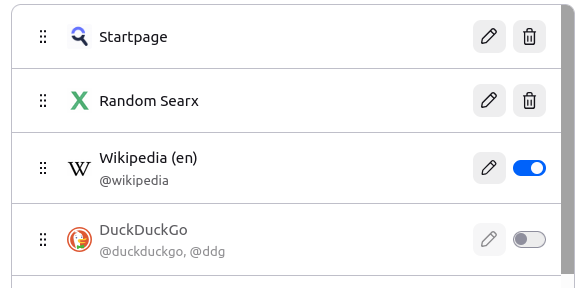
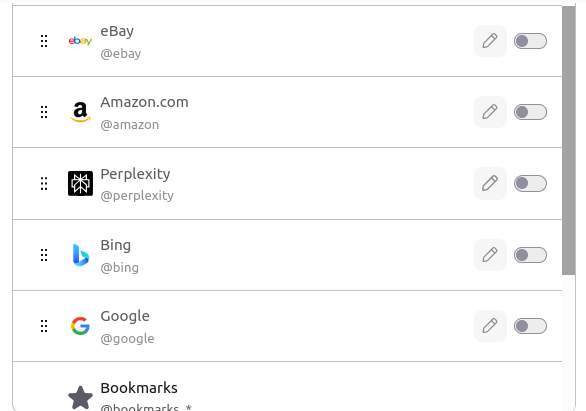
Google and Bing were at the top of the list until I moved them to the bottom.
The old Remove button is gone, and replaced with a trash icon next to the engines added by the user. The “hard-coded” engines don’t provide a trash icon!
LibreWolf has delayed implementation of the above: We have decided to wait a bit longer to enable the settings redesign, due to use being aware of multiple upstream issues (sic)
So in LibreWolf it’s still like this, with all engines being freely removable:

Probably thanks to this entry in about:config:

Which doesn’t appear to work in Firefox 152. (I had to add it to about:config in Firefox, as it wasn’t there. But I don’t recall if it was default in LibreWolf or if I added it myself long ago.)
The rest of the settings page seems very busy to me, and some items are now inexplicably hidden within “more-settings” type menus, despite Mozilla’s supposed reasoning for expanding and reorganizing the preferences panel.
2 Likes
So why don’t abandon Firefox to use exclusively epiphany?
1 Like
Epiphany doesn’t have the level of customization or privacy measures that I need.
On desktop, I’ve been migrating everything away from Firefox and Firefox-ESR to LibreWolf (with additional profiles, in order to compartmentalize browsing), and Mullvad browser.
2 Likes
Thanks for the answer! 
I’m curious to know why, Community, doesn’t empower epiphany with more customisations so to allow us to abandon Firefox.. 
In my opinion Firefox is going closer to capitalism surveillance during time so it’ll reach a date that we’ll be forced to abandon it because it’ll be like explorer, safari,… so we’d work now on GNU/Broswer to be ready to move
1 Like
That’s not the GNOME way. 
2 Likes
I guess in fairness, “removing” them in <=151 never truly deleted them as you could just click the “Restore Default Search Engines” button and then Google, Bing, and the others would come back. They were merely hidden before.
1 Like
That’s true, but I just hate even having to see them in my settings.
5 Likes
On Librem5 i use the Mobile optimized Interface configuration. And all previous settings are the same.
The settings Menue is still the same you have a search bar to find something or can click on the looking glass for the search options. And there are some search engines add again and you have to remove or disable them, or use it only with a shortcut.
Or as i prefer disable them in the main address bar. However have a privet local html page with your favorite bookmarks. It got add because of cat and mouse game for free software and the search to make money from the users who do not know how to use computers. It is as old as Computers, free Demos, Freeware and other services goes. No shame for someone.
But there its not gone you can add and remove every installed new search engine. And you have to every time you updated the main stream version of your browser. Try to not storage cookies on the system and clean history every time you close it and your update could not leak it to some handsome LLM.
The mobile version on Librem 5 is based on Firefox-ESR, which hasn’t received the new design, and won’t until the next major version of ESR.
But in my previous post, I was describing the desktop Firefox (main release) settings.
1 Like
Let’s celebrate that we have choices. There are hundreds of good reasons why an individual user might prefer Firefox over the GNU browser, and equally many reasons for preferring the opposite. No need for anyone to feel ashamed.
Firefox being available on PureOS is a good thing.
2 Likes
But this is Gnu systems which there are not choices if something is garbage, why make gpure same choice like garbage Mobian, PMOS??
So gpure is for unweak user, which claim a super clean os.
Firefox being available on PureOS is a BAD thing.
1 Like
Yes this and i missed the recent update to 152. So you have a point.
However you could load the mobile config to your Desktop Firefox too. And you can still block the LLMs or Ip Addresses.
However. LLMs are like Kids or animals you should observe and take care about there actions if you have to use it do it only via a local LLM installed on your Raspi and configure the system tight.
Which did not keep Apps from not implement A.I.s. Try to compile firefox yourself and check the source code. Or run it offline with a “only visited and requested web pages feed to the client browser past some malware detection and add removing”. Solution..
Even with 152. I have a a usual Browser and no LLM teaching me. Try to not use search and keep your Kids of the old Web. Read Books, use LLMs answers by filtering there output. Or processed by a Scripted computer after some interaction.